
-
Bei Search console steht meine website eingetragen, so wie in den allgemeinen einstellungen bei wordpress die URL auch eingetragen ist, aber sowohl search console als auch analysen sind auf ROT gestellt, diese erkennen die automatisch eingetragene Website nicht. Alle Zugriffsberechtigungen mit rankmath sind bestätigt. Er kann sich nicht verbingen.

-
Hello,
Es tut mir leid, dass Sie Probleme mit der Verbindung von Rank Math und der Search Console haben. Es scheint, dass Ihre Website in der Search Console und in den allgemeinen Einstellungen von WordPress korrekt eingetragen ist, aber die Analysen in Rank Math sind dennoch rot markiert und erkennen die automatisch eingetragene Website nicht.
Um dieses Problem zu lösen, empfehle ich Ihnen, die Verbindung zwischen Rank Math und der Search Console manuell zu überprüfen und gegebenenfalls neu herzustellen. Hier sind die Schritte, die Sie befolgen können:
- Gehen Sie zu Rank Math SEO → Allgemeine Einstellungen → Analytics.
- Wählen Sie unter der Dropdown-Liste "Site" Ihre Website aus.
- Wählen Sie das entsprechende URL-Property für eine reibungslose Analyseerfahrung aus.
- Wählen Sie Ihr Land aus der Dropdown-Liste.
- Klicken Sie auf "Änderungen speichern".
Wenn das Problem weiterhin besteht, können Sie auch versuchen, Ihre Website manuell in der Google Search Console zu verifizieren. Hier ist ein Link, der Ihnen zeigt, wie Sie Ihre Website manuell in der Google Search Console verifizieren können.
Bitte überprüfen Sie diese Schritte, um das Problem mit der Verbindung zwischen Rank Math und der Search Console zu lösen. Wenn das Problem weiterhin besteht, antworten Sie bitte auf dieses Ticket, und ein menschlicher Agent wird Ihnen weiterhelfen.
Vielen Dank für Ihr Verständnis und Ihre Geduld.
Schönen Tag!
Sources:
Analyzing Your Site’s SEO with Rank Math’s SEO Analysis Tool
How to Connect Your Google Account With Rank Math SEO » Rank Math
How to Verify Your Website on Google » Rank Math
WordPress Multilingual SEO With RankMath & Weglot @ RankMathHello,
Thank you for contacting the support, and sorry for any inconvenience that might have been caused due to that.
If you do not see any data inside your Analytics module, this guide might help you.
https://rankmath.com/kb/connect-your-google-account/In case the data is still not coming in, we have covered some common fixes here: https://rankmath.com/kb/analytics-issues/
We really look forward to helping you. Thank you.
Leider hat mir das nicht weitergeholfen. Ich bitte um weitere Hilfe. Ich bin nicht fit in diesem Programm, daher wäre eine detaillierte Schritt für Schritt Anleitung für mich am sinnvollsten.
Nach wie vor ist *Search Console* und *Analysen* auf ROT gestellt, obwohl die Website automatisch erkannt wurde. NEU verbinden bringt leider auch nichts.Hello,
In this case, please follow the steps below to create a troubleshooting log so that we can check the issue further:
Step #1.
First, add the following filter to your website:add_filter( 'rank_math/analytics/log_response', '__return_true' );Here is a guide you can follow to add the filter:
https://rankmath.com/kb/wordpress-hooks-actions-filters/Step #2.
After adding the filter, please run the pending Scheduled Action from your WordPress Dashboard > Tools > Scheduled Actions > Pending:If in your case, you do not see the Scheduled Actions menu, then you can try visiting the following URL:
https://yourdomain.com/wp-admin/tools.php?page=action-scheduler&status=pendingEnsure that you replace
yourdomain.comwith your own domain in the above link.Step #3.
When some actions have completed running, please check the Analytics log under /wp-content/uploads/rank-math and share that with us.You can use a tool like Dropbox/Pastebin for debug log files and share the generated links here.
Looking forward to helping you.
Vielen Dank für die Bemühungen. Leider hat auch das nichts gebracht. Habe genau die Anweisungen befolgt und es hat alles prima funktioniert. Aber rankmath / meine Website / Google Dienste sind immer noch nicht verbunden. Jetzt ist bei Search Console auch meine WEbsite nicht mehr zu sehen. Was kann ich noch tun? Gibt es noch weitere Möglichkeiten, die mir helfen könnten?
Hello,
You would need to have a verified Google Analytics and Google Search Console property, if you do not have, please follow the attached link to create one.
1) Please make sure you have the latest version of the Rank Math plugin installed on your site. You can check the latest version here: https://rankmath.com/changelog/free/
2) Check to make sure that you have verified Google Search Console, if not, follow this guide: https://rankmath.com/kb/google-site-verification/
3) Please make sure that you are not connecting to Google Search Console via a domain property but rather a URL prefix and that you have verified the correct version of your website on the Google Search Console (HTTP or HTTPS, www or non-www).
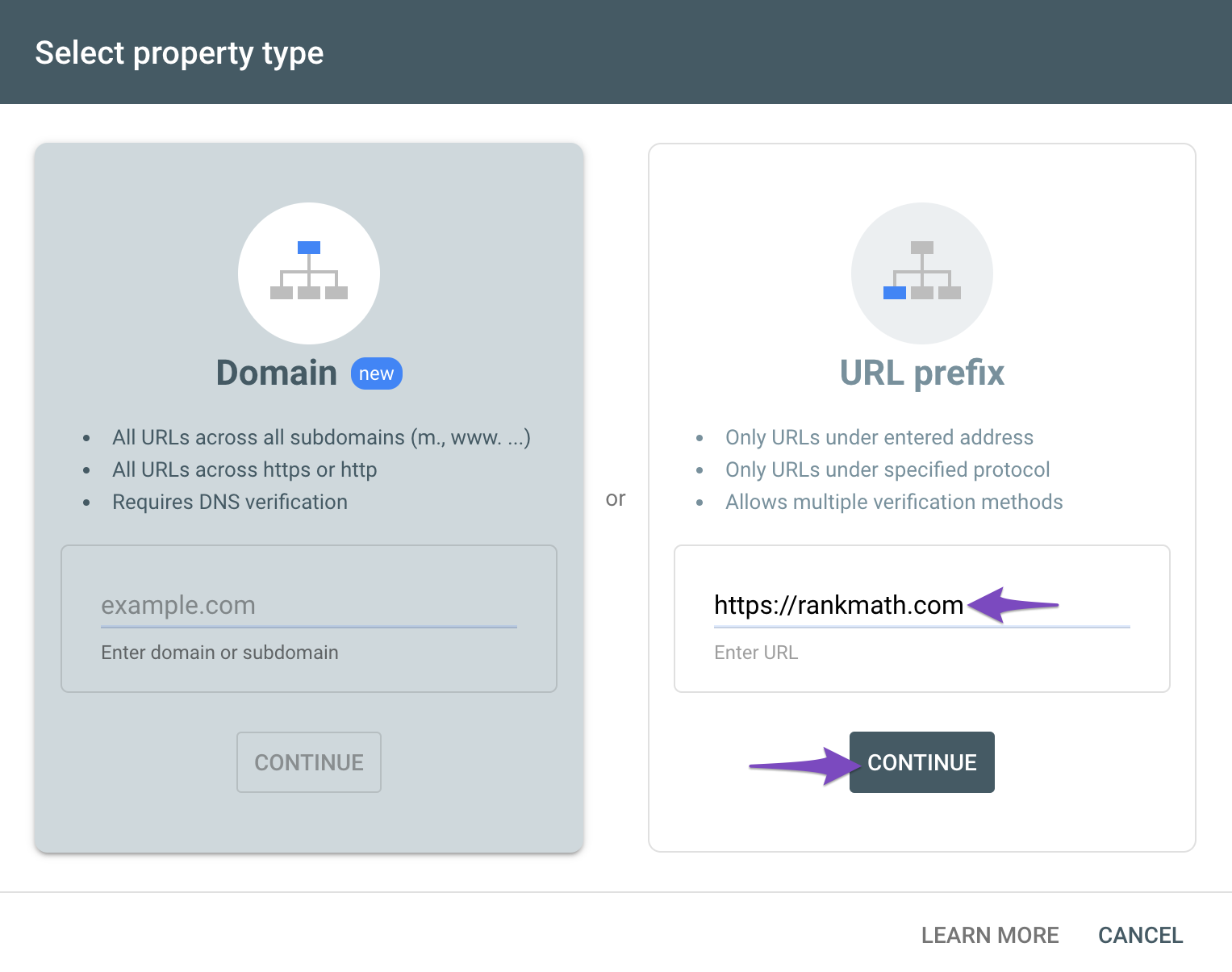
You can follow our guide here to create the URL Prefix property:
https://rankmath.com/kb/google-site-verification/#num-1-1-open-google-search-consoleThe URL-prefix property also helps keep your sitemap in sync with Google Search Console as we submit it automatically for you. In addition, the domain property won’t work correctly on some sections of the Analytics module such as the IndexStatus.
4) Then remove Rank Math’s access from Google. Please remove RankMath’s app from your Google apps permissions: https://myaccount.google.com/permissions
5) Reconnect the Google account again to regenerate the auth token from Google, by going to WordPress Dashboard > Rank Math > General Settings > Analytics and configure the Search Console and Analytics settings again.
6) Grant all necessary permissions
Kindly check all necessary checkboxes to allow Rank Math to access some of the Google Services. Please check the screenshot below for reference:
7) Follow the instructions to sign in with your Google account and allow Rank Math to access your data. https://rankmath.com/kb/connect-your-google-account/
You can also refer to this guide for more details: https://rankmath.com/kb/analytics-issues/#expired-google-oauth-token
We hope this resolves the issue for you.
If you still face any problems or have any questions, please let us know. We’re always here to help.
Thank you.
Danke für das Helfen.
Hab es geschafft mit Hilfe von YouTube und es funktioniert. Alles ist connected und auf grün.Hello,
We are glad to know that this issue has been resolved. Thank you for letting us know.
This ticket will be closed now, but you can always open a new one if you have any other questions or concerns. We are here to help you with anything related to Rank Math.
We appreciate your patience and cooperation throughout this process.
Thank you for choosing Rank Math.



The ticket ‘rank math domain’ is closed to new replies.