
-
Hi, I’ve set up some redirects, but they don’t appear to be passing on UTM values. I’ve read your help article on UTM parameters which states that RankMath will by default pass these values along to the new URL, though I don’t seem to be experiencing that. Here is an example URL that we have a redirect set up for. It redirects without passing along the parameters:
Any idea why this could be happening?

-
Hello,
I apologize for the issue you are facing with the UTM parameters not being passed along with the redirects. In Rank Math, by default, all query strings, including UTM parameters, should be passed to the redirected URL.
To ensure that the UTM parameters are passed along with the redirect, you can check if the redirect source URL match is set to contains instead of exact. Changing this setting should resolve the issue and ensure that your redirections function as intended.
Here is an example of how to configure the redirect source URL match type:
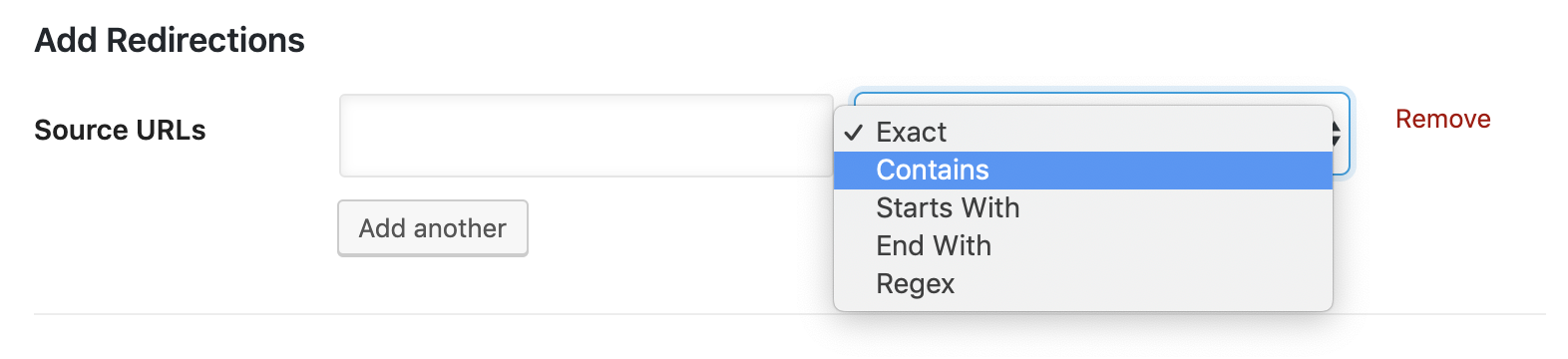
After making this adjustment, please test the redirect again using the example URL you provided, and the UTM parameters should be passed along correctly.
If you continue to experience issues with the UTM parameters not being passed along after making this change, please feel free to reach out to our support team for further assistance.
Thank you for bringing this to our attention.
Sources:
Using UTM Parameters With Redirects » Rank Math
Solving Redirection Issues Using Rank Math SEO Plugin » Rank MathHi, I’ve made these changes to use the “Contains” setting for our redirects. This link is still stripping the UTMs on my end. Perhaps there is a lag?
Hello,
Yes, Rank Math passes all the query strings (including the UTM parameters) to the redirected URL.
For troubleshooting, please clear your website and server’s cache.
If the issue persists, try adding this filter on your site:
add_filter( 'rank_math/redirection/add_query_string', function($value, $matched) {
	return true;
}, 10, 2 );
If you’re not sure how to add this code, you can follow this guide:
https://rankmath.com/kb/wordpress-hooks-actions-filters/Also, it seems that you’re using Rank Math PRO but the account you have used to open this ticket is the Rank Math free version.
Can you please search and forward a receipt from FastSpring.com or the email address you used to purchase so we can locate your account and verify it?
Looking forward to helping you.
Hello, thank you for your help.
We’ve added this filter to the site but it doesn’t seem to be working correctly unfortunately, I’m still having utms stripped when accessing this URL: https://opentrons.com/products/robots/?utm_source=google&utm_medium=cpc&utm_campaign=test_campaign_name
Our Rankmath account is associated with the email address “p***@g***************” I believe. Any suggestions on next steps to take to address this?
Hello,
To help you investigate this issue, we might need to take a closer look at your website and settings. Please follow these steps:
- Edit the first post on this ticket and include your WordPress logins in the Sensitive Data section. This is a secure section that only our support staff can access.
- Make sure you take a complete backup of your website before sharing the information with us.
- If you prefer, you can use this plugin to generate a temporary login URL to your website and share that with us instead: https://wordpress.org/plugins/temporary-login-without-password/
- You can also use this plugin to monitor what changes our staff might make on your website (if any): https://wordpress.org/plugins/wp-security-audit-log/
We appreciate your cooperation and patience. Thank you for choosing Rank Math.
Hello,
I have updated the sensitive data as requested. Can you please check further?
Thank you.
Hello,
This issue is being caused by the fact that you have enabled the debugger for the redirections. That runs before the plugin checks the query strings and tries to pass them to the URL.
You can check the behavior here after disabling the debugging: https://i.rankmath.com/v/yLjypK
Don’t hesitate to get in touch if you have any other questions.
Hi Miguel, thank you for your assistance, and for this screen recording. I see that with the debugger diasbled the UTM parameters are being passed on (as displayed in your screen recording). However, on my end it looks like this will only occur if I am currently logged in to our WordPress Admin Panel.
For instance, the UTM parameters will be passed along when the test URL (https://opentrons.com/products/robots/?utm_source=google&utm_medium=cpc&utm_campaign=test_campaign_name) is entered within a browser where I am logged in to our WordPress Admin Panel.
But they will not be passed along when the test URL is entered into a browser where I am not logged in to our WP Admin Panel (such as in a Chrome Incognito tab). Any idea why this would be the case? Thanks once again for your assistance.
Best,
EvanHello,
We are able to log in to your website with the access details provided in the sensitive data section.
We logged in and can replicate this issue. We have shared this with our developers. We will get back to you once we have an update or solution from them.
In the meantime, can you please add your site’s FTP access details in the Sensitive Data Section so we can debug this by making changes in the plugin files? You can request this from your host.
Thank you so much for your patience while we resolve this for you.
Hello,
Since the issue only happens to non logged in users, and we were not able to reproduce on our dev setups.
Could you please create a staging site, where it will be safe to troubleshoot for non logged in users without affecting your ordinary site visitors.
Here is a well detailed walk through on how to create a staging site, on most popular hosts; https://www.wpbeginner.com/wp-tutorials/how-to-create-staging-environment-for-a-wordpress-site/
We look forward to having this issue resolved.
Thank you.
Hello,
Since we did not hear back from you for 15 days, we are assuming that you found the solution. We are closing this support ticket.
If you still need assistance or any other help, please feel free to open a new support ticket, and we will be more than happy to assist.
Thank you.
- Edit the first post on this ticket and include your WordPress logins in the Sensitive Data section. This is a secure section that only our support staff can access.



The ticket ‘Assistance with Redirects & UTMS’ is closed to new replies.