
-
Hello my Website is not Indexing Because of Your Plugin. Do you have any solution for i switch back to toast. Because now website is not because of your plugin. Having problem of no index on my whole website?

-
Hello,
I apologize for the issue you are facing with your website indexing due to our plugin. If you are experiencing problems with the indexing of your website and want to switch back to another SEO plugin like Yoast, we recommend following these steps:
- Disable the indexing of search results pages in Rank Math:
- Navigate to Rank Math SEO → Tiles & Meta → Misc Pages in your WordPress dashboard.
- Enable the Noindex Search Results option.
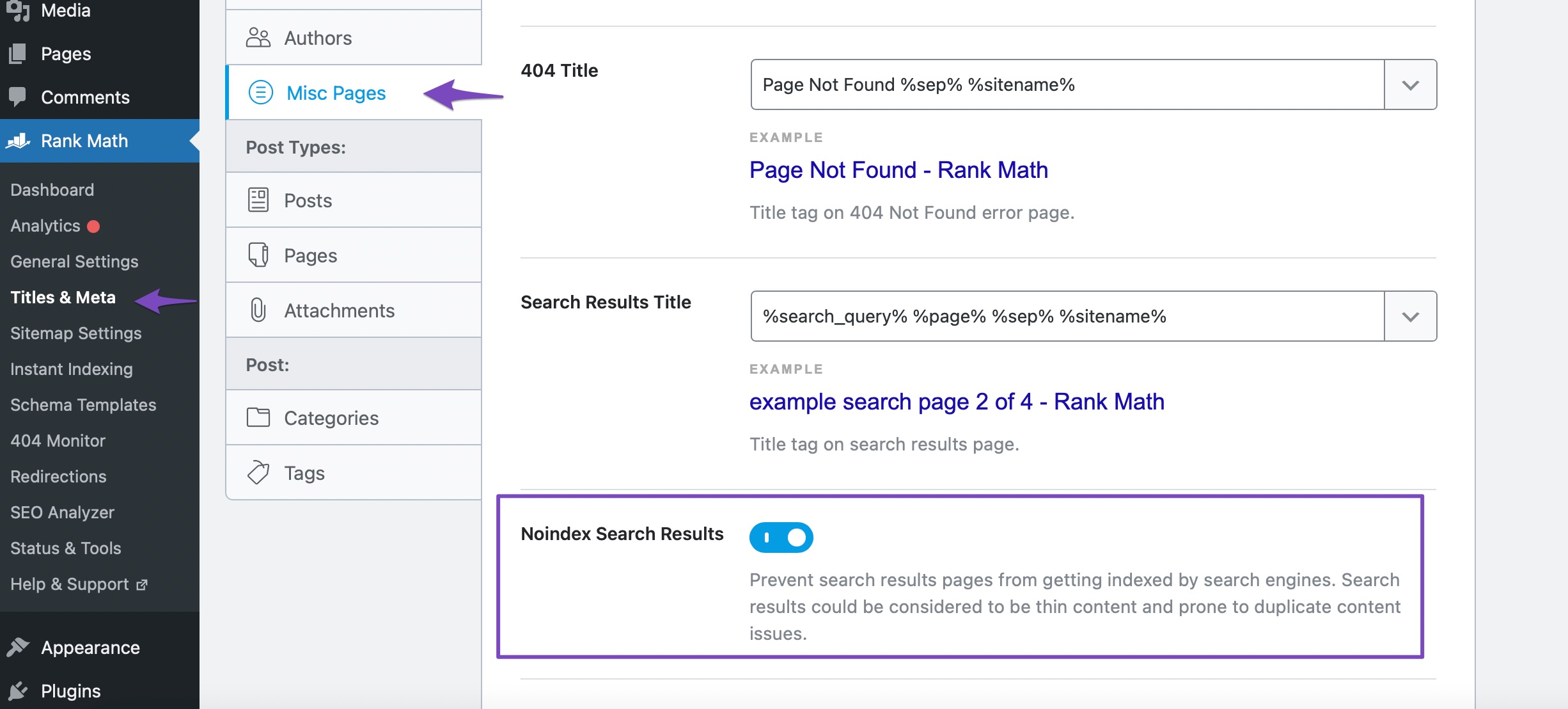
- If you still encounter issues after disabling the indexing in Rank Math, you can consider switching back to Yoast SEO or another SEO plugin.
However, if you need further assistance or have any questions, please feel free to contact our dedicated support team. They are available 24/7, 365 days a year and will be happy to help you with any concerns you might have.
Thank you for reaching out, and we appreciate your understanding. Let us know if there is anything else we can assist you with.
Sources:
Is Your Site the Victim of Internal Site Search Spam? » Rank Math
This Plugin Does Not Work with Your Version of PHP » Rank Math
Why Did My Website Disappear From Google Search? » Rank Math
Why Google Hasn’t Indexed Your Post, Page, and/or Website? » Rank MathAny human here to solve my problem?
Hello,
Thank you for contacting us and sorry for any inconvenience that might have been caused due to that.
We checked your website and we can see it is already indexed on Google:
In case, you’re facing the issue with some specific URLs, please share them with us so that we can check the issue further for you.
Meanwhile, please check your Google Search Console Page Indexing report to determine any issues reported on your site: https://support.google.com/webmasters/answer/7440203?hl=en
You can share the error message or take a screenshot using this tool and add the link here so we can check as well.
Looking forward to helping you.
Thank you.
Bro I have 57 articles posted and you are showing me only one article indexed.
Please check my Rank math plugin to see if there is any error?
Hello,
Your sitemaps and robots.txt are working fine. Also, your URLs are already set to index.
In this case, please clear your website’s cache and revalidate the issue in your Google Search Console account. Once done, give Google some time to recrawl your site.
If the issue persists, you should check your Google Search Console coverage section to determine any issues reported on your URLs that may have prevented your site from being indexed:
https://support.artlogic.net/hc/en-gb/articles/360016851260-Google-Search-Console-errors-and-coverage-issuesLooking forward to helping you.
Please suggest any WordPress plugin to clear cache?
Hello,
Are you using any optimization plugin on your site? If you are using optimization plugins such as WP Rocket, W3 Total Cache, WP Super Cache, LiteSpeed Cache, etc they usually have options to clear their cache of your site, and they usually make it easily accessible:

After clearing the cache, revalidate your site in Google Search Console and allow some time for Google to recrawl your site.
Hope that helps.
Thanks.
I’m using Autoptimize. Does this also work?
Hello.
Yes, the referenced plugin is an optimization plugin.
Please refer to this article on clearing Autoptimize’s cache: https://divimode.com/knowledge-base/clear-cache-autoptimize/#:~:text=To%20clear%20all%20cached%20data,Was%20this%20article%20helpful%3F
Hope that helps, and please do not hesitate to let us know if you need our assistance with anything else.
I have done that but the problem is still the same.
I cleared the cache in autoptimize and re-submitted the sitemap on the search console.
Can you check my WordPress or Rank math plugin to resolve this issue?
Hello,
Google Search Console is reporting that some of your pages are not indexed because they are marked with the “noindex” tag
Can you please share the URL of the pages that have been flagged by Google so we can further assist you?
The “Excluded by noindex tag” status is not an error, but a report that shows you which pages on your website are marked with the
noindextag. Thenoindextag tells Google not to index a certain page on your website. This can be useful if you have a page that you don’t want people to find in search results, such as blank posts or tags.The “excluded by noindex tag” status means that Google has found a
noindextag on your page. This could be due to a number of reasons:Please follow the steps in this guide to fix the “Excluded by NoIndex Tag” Status:
https://rankmath.com/kb/excluded-by-noindex-tag/Hope this helps.
We look forward to hearing from you.
Thank you.
Hello,
We checked the affected post’s page source and the correct title and description meta tag is already generated as you can see from the screenshot below:
Please note that it is a pretty common thing with Google these days. It happens with 70% of the results that even if everything’s fine, Google decides to show a different meta information for your search keyword, there is nothing you can do as Google sometimes ignores the custom meta info altogether and show something from the page’s content that matches the search intent better.
To understand more about this, please check this article: https://rankmath.com/kb/different-meta-title-and-description/
As for your indexing issue, please share a couple of affected URLs that are marked as
noindexaccording to Google.Looking forward to hearing back from you.
Hello,
Since we did not hear back from you for 15 days, we are assuming that you found the solution. We are closing this support ticket.
If you still need assistance or any other help, please feel free to open a new support ticket, and we will be more than happy to assist.
Thank you.
- Disable the indexing of search results pages in Rank Math:



The ticket ‘Website not Indexing Because of Your Plugin’ is closed to new replies.