Name is not changing

#776597
  • Resolved Ahmad Bilal
    Rank Math free

    Hi, I hope you are doing well. I am trying to change my website name from the rankmath setup wizard, but its not changing, I tried a lot, but isn’t changing.

    https://foodiesmag.com
    OLd name : Foodies/’ Mag
    What to change: Foodies’ Mag

Viewing 1 replies (of 1 total)

  • Hello, we apologize for the inconvenience you are facing with changing your website name in Rank Math setup wizard. To update your website name successfully, you can follow these steps:

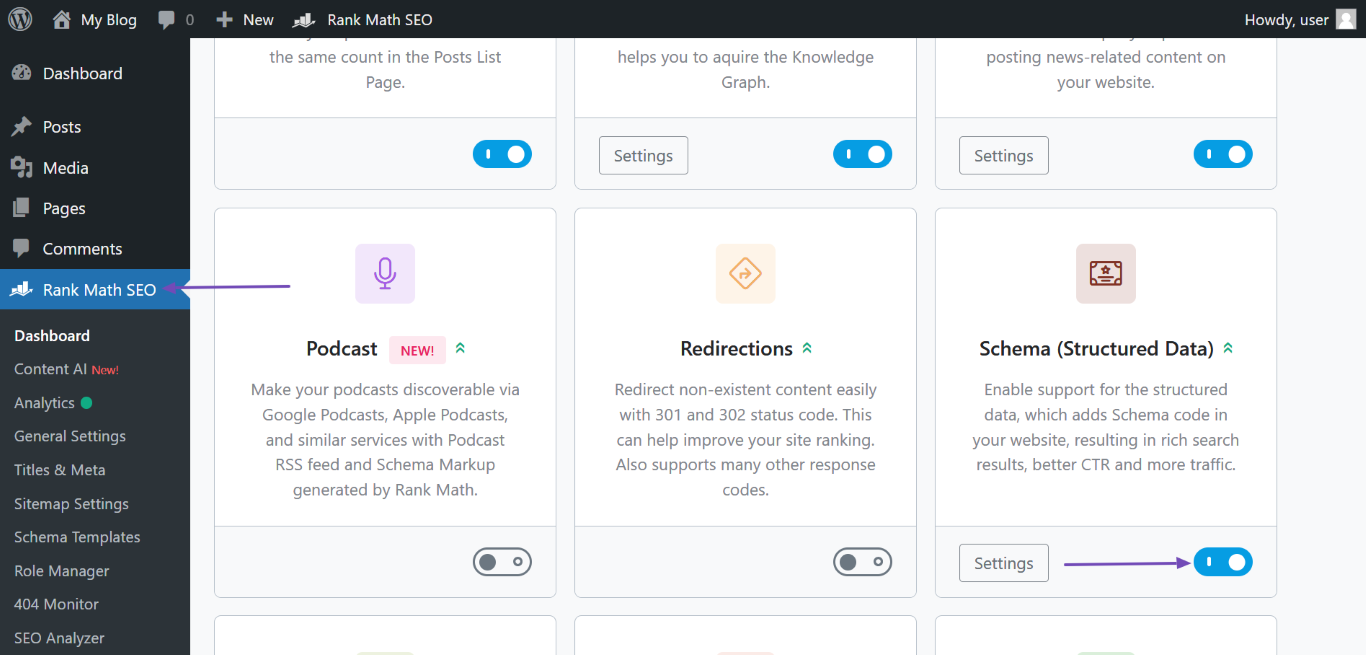
    1. Head to your WordPress Dashboard and navigate to Rank Math SEO.
    2. Enable the Schema module as shown in the screenshot below:
      Enable Schema in Rank Math
    3. Proceed to Rank Math SEO → Titles & Meta → Local SEO.
    4. Update the Website Name field with your desired name, in this case, “Foodies’ Mag”.
    5. Fill in any other required fields on the page.
    6. Scroll down and click Save Changes to apply the updates.

    After following these steps, your website name should be updated successfully. If you encounter any further issues or need additional assistance, feel free to reach out to us. Thank you for bringing this to our attention!

    Sources:
    Why Google Displays URL Instead of Site Name in SERP? » Rank Math
    How to Setup Rank Math SEO Plugin Properly
    Why Google Displays URL Instead of Site Name in SERP? » Rank Math

Viewing 1 replies (of 1 total)

You must be logged in to reply to this ticket.