Hello,
Thank you for contacting Rank Math and bringing your concern to our attention. I’m sorry for any inconvenience this issue may have caused you.
Please note that the FAQ data should match both the schema and the front end of your products.
This also happens when you hide the questions and answers on the front end.
Here’s a link for more information:
https://rankmath.com/kb/fix-mainentity-schema-issues/
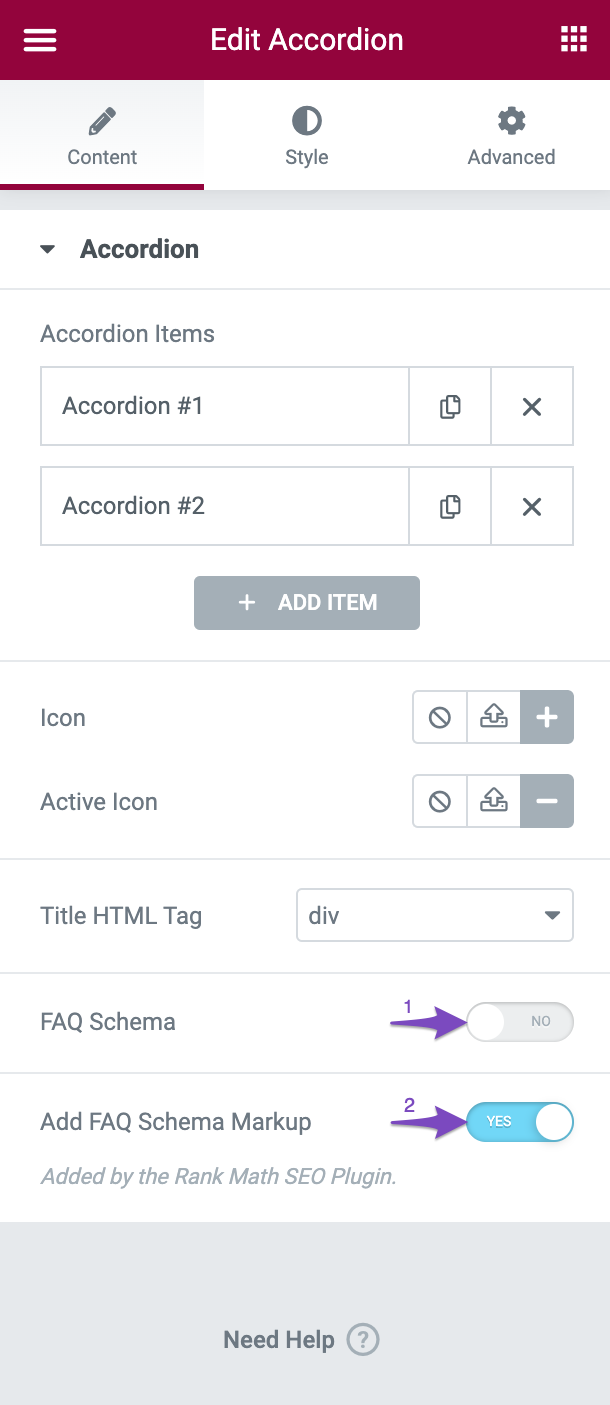
However, you may need to disable the FAQ Schema (Option number 1) in the Elementor accordion so the FAQ Schema won’t be added to your page|
Hope that helps.
Thank you.
I can only see option 1 ob my Elementor page and I can’t see option 2 and I use Rankmath
I need to know how to enable the “Add FAQ Schema Markup” and not “FAQ Schema” as the former is not part of the options on Elementor
Hello,
Please note that the feature “Add FAQ Schema Markup” in the Elementor Accordion settings is only for the PRO version of the Rank Math plugin. As you’re using the Free version of the Rank Math plugin that’s why you’re not able to see this option.
The only way to add the FAQ Schema in the Free version of the Rank Math plugin is by using the FAQ block in the block editor. https://rankmath.com/kb/faq-schema-block/
However, you can share the affected URL with us so that we can check the FAQ Schema issue further for you.
Looking forward to helping you.
Thank you.
Hello,
Since we did not hear back from you for 15 days, we are assuming that you found the solution. We are closing this support ticket.
If you still need assistance or any other help, please feel free to open a new support ticket, and we will be more than happy to assist.
Thank you.



