Hello,
Thank you for contacting the Rank Math support.
1.) Do you have a live chat and support to help with the Rank Math connfiguration of my site?
We’re believe that every question requires it’s due share of attention and to give proper response to all the questions raise, we only offer e-mail support. Though it’s e-mail support but we’re available 24×7 to answer all your queries. About Rank Math configuration please follow these article, as it lays down every option to configure the plugin:
https://rankmath.com/kb/installation/
https://rankmath.com/kb/how-to-setup/#step-1-import-data
I would suggest going through the articles mentioned here as well for proper understanding: https://rankmath.com/kb/wordpress/getting-started/
2.) if I have yoast, I just deactivate and that’s it?
Ideally, that should work but having deactivated plugin in WordPress doesn’t serve any purpose. Before you deactivate you need to import the settings from Yoast and to help you with this, please follow this article: https://rankmath.com/kb/yoast-seo-migration/
3.) can it also index my post? I am not familiar but I think some of my articles needs indexing
Yes, you can index post, pages and other links as well.
Please follow these articles: https://rankmath.com/kb/connect-your-google-account/
https://support.google.com/webmasters/answer/10267942?hl=en
4.) is it a lot of work to fix the issues of a site after i install it?
No, it isn’t. I would suggest going through our knowledgebase to beneficial as we have articles for all possible situation. https://rankmath.com/kb/
Moreover, if you’re stuck we are just an e-mail away 🙂
Hope that helps and please do not hesitate to let us know if you need our assistance with anything else.
Thank you
Hi,
1.) Oh no i did not import any Yoast data so i just deleted my Yoast plugin. is that ok?
2.) It can index every post of my site?
3.) can rank math help in the page speed of my site?
Hello,
1. If you didn’t optimize your site using Yoast before, then that is fine. In this way, you can start optimizing your site using Rank Math from scratch.
However, if you have already optimized your meta titles/descriptions/keywords etc. using Yoast, then you may need to import those data from Yoast to Rank Math.
You can check if those data are still available in your database by heading to your WordPress dashboard > Rank Math > Status & Tools > Import & Export tab. You can follow the steps in this link:
https://rankmath.com/kb/yoast-seo-migration/#import-and-export
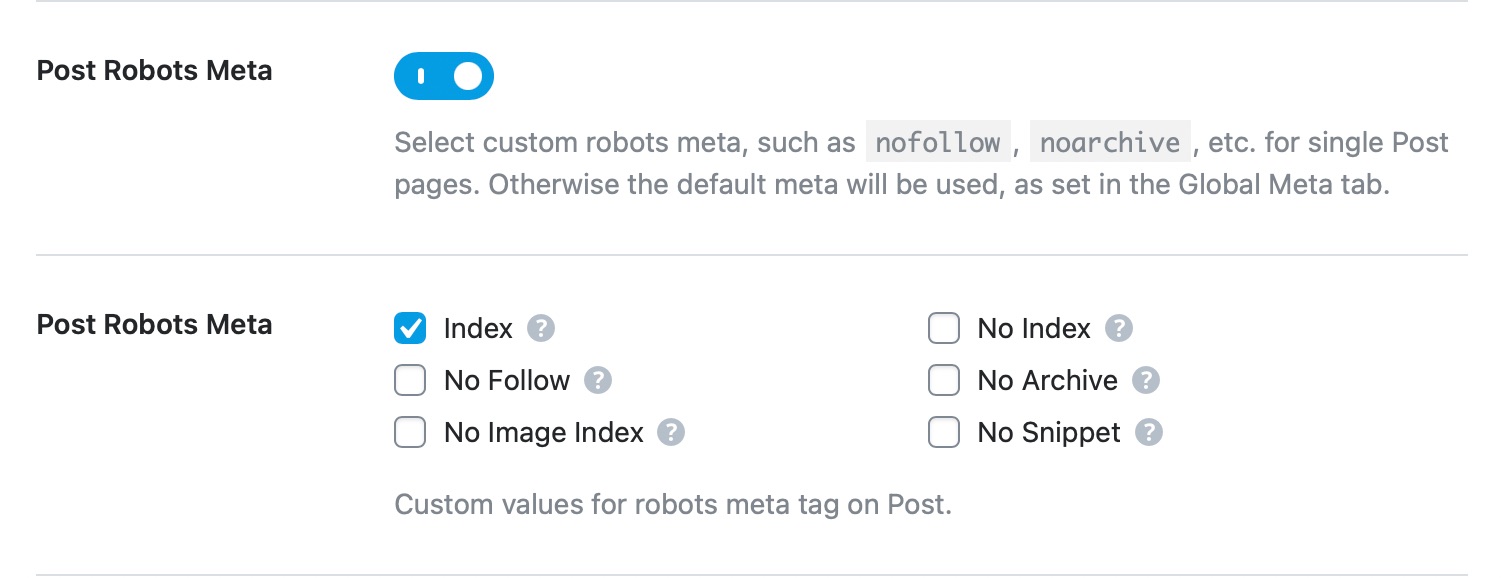
2. Yes, Rank Math makes it easy to set your posts to index. You can set your post types to index in Rank Math > Titles & Meta > [Post type] > Robots Meta, then check/enable the Index option
3. Rank Math does not help in increasing your website’s speed and performance. There are plugins specifically made for that like caching plugins. However, if you’re interested in speeding up your website, we recommend referring to this WordPress speed optimization guide here:
https://mythemeshop.com/blog/wordpress-speed-optimization/
4. Please note that Ranking on search engines like Google depends on so much more than just on on-page optimization. You could have the “perfect” content, and still, struggle to make it to the top 10 results in SERPs (search engine results pages).
Here’s a guide you can check for the factors that Google considers when evaluating websites:
https://rankmath.com/kb/does-installing-rank-math-guarantee-rankings/
Hope that helps.
Thank you.
Hello,
Since we did not hear back from you for 15 days, we are assuming that you found the solution. We are closing this support ticket.
If you still need assistance or any other help, please feel free to open a new support ticket, and we will be more than happy to assist.
Thank you.



