Hello,
Thank you for contacting Rank Math and bringing your concern to our attention. I’m sorry for any inconvenience this issue may have caused you.
Could you please confirm if you have verified your website in Rank Math > General Settings > Webmaster Tools?
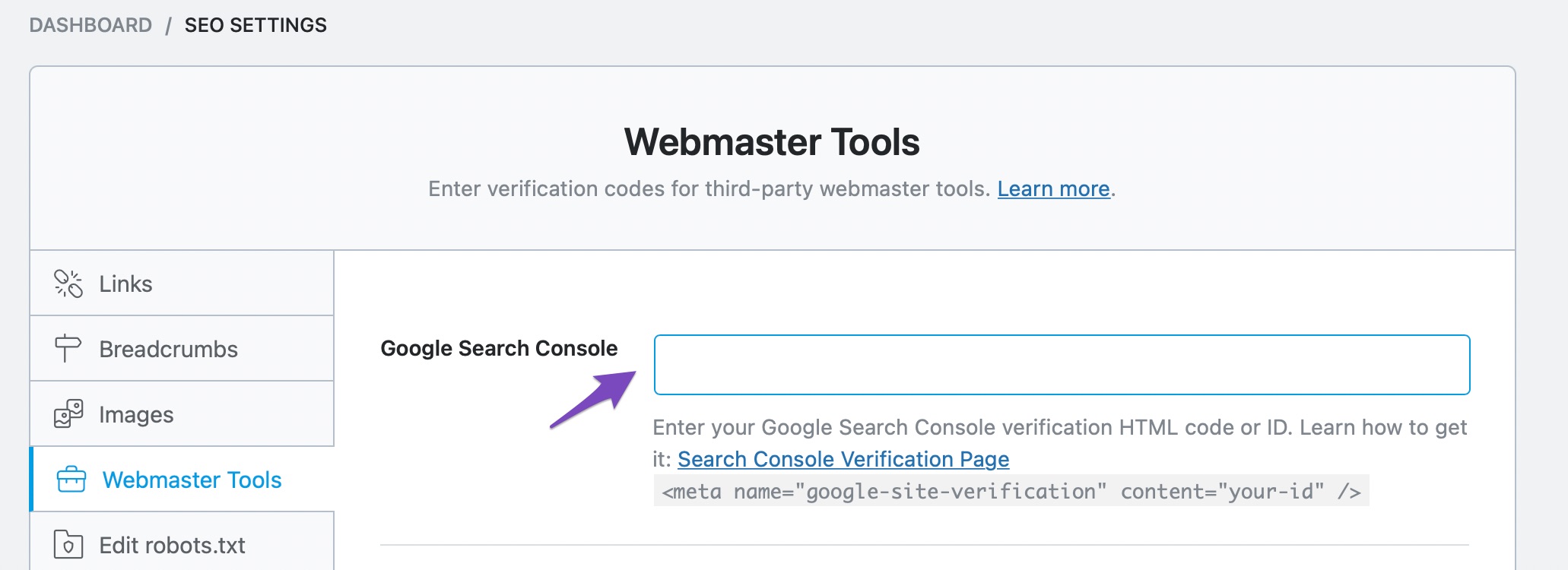
If so, please remove the ID in that field and clear your website’s cache.
If you haven’t verified using that method, please delete RankMath’s app from here:
https://myaccount.google.com/permissions
Let us know how this goes.
Thank you.
I removed it from both Google and Webmaster Tools, but I’m still verified owner.
I inspected the source code and it still says
meta name="google-site-verification" content="R-17laq6jUiuNeQqG8ZSY142fB_7B-Ku5XY7g-elYS0" />
<!-- /Rank Math WordPress SEO plugin
So I assume it’s still automatically verified by Rank Math plugin? How long does it usually takes to un-verify?
Hello,
The verification code should be removed instantly from your page’s source code once you have removed the ID in Webmaster tools.
In this case, please disable the Analytics module temporarily in Rank Math > Dashboard. Then, clear your website’s cache and the transients at Rank Math > Status & Tools > Database Tools > Remove transients

Let us know how this goes.
Thank you.
Hello,
Since we did not hear back from you for 15 days, we are assuming that you found the solution. We are closing this support ticket.
If you still need assistance or any other help, please feel free to open a new support ticket, and we will be more than happy to assist.
Thank you.



