No rank math analytics data shown in my site
Hello,
Thanks for contacting us, and sorry for any inconvenience that might have been caused due to that.
It looks like you forgot to share your admin URL in the sensitive data section. Please update the credentials, so that we can check.
Meanwhile, please head over to WordPress dashboard > Tools > Scheduled Actions > Pending.
or you can try visiting the following URL:
https://yourdomain.com/wp-admin/tools.php?page=action-scheduler&status=pending
Run the rank_math/analytics/data_fetch scheduled action and wait for the data fetch to complete.
This is how it should look like: 
After that, please allow Rank Math a while to fetch data from Google Analytics and you should be able to see the updated data on Rank Math Analytics dashboard.
Let us know how that goes. Looking forward to helping you.
Thank you.
Hello,
I have updated the sensitive data as requested. Can you please check further?
Thank you.
Hello,
Thank you for your patience.
I’ve tried fetching the data on your site, but the issue still persists.
In this case, please follow the steps here:
1. Disconnect and reconnect your account from inside WordPress:

2. Please delete RankMath’s app from here:
https://myaccount.google.com/permissions

3. Re-create tables by clicking WP Dashboard > Rank Math > Status & Tools > Database Tools and click the Re-create database Table button.

4. Reconnect the account inside Rank Math by clicking here and ensure that you approve all the permission notices that show up:
WP Dashboard >> Rank Math >> General Settings >> Analytics tab, and click the Reconnect link

Allow all the permissions on the next screen.
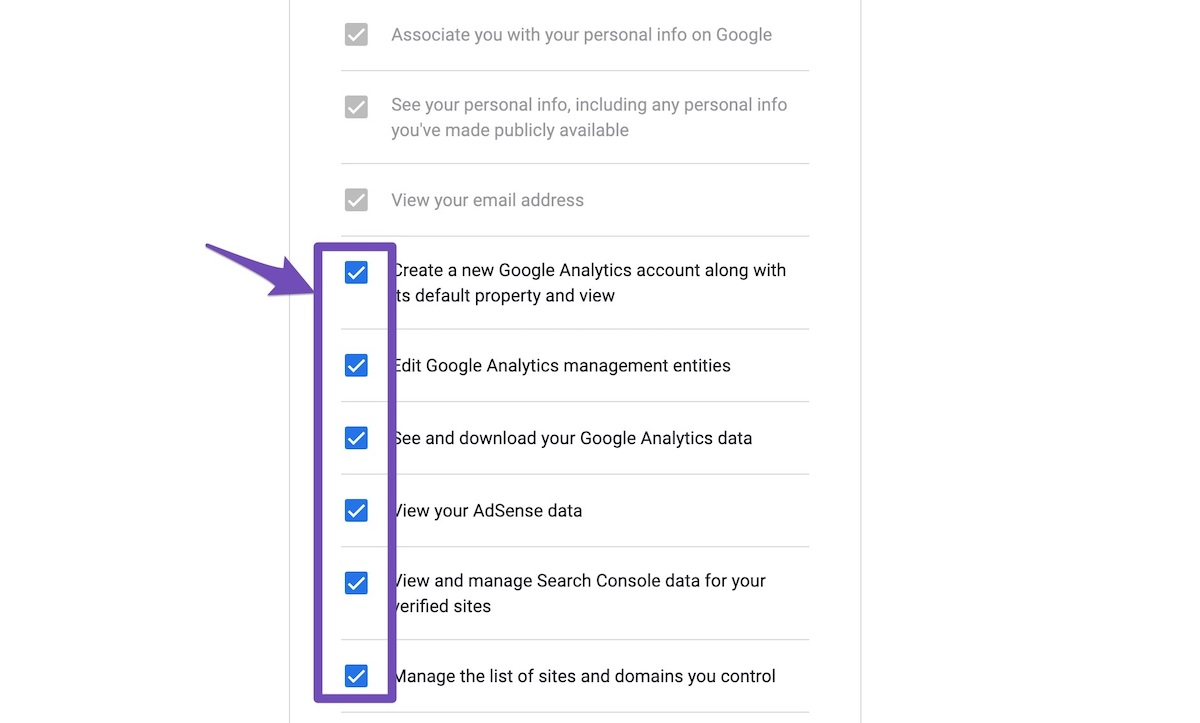
5. Let the process complete, which might take around 30 minutes.
6. Now head over to WP Dashboard > Rank Math > Status & Tools > Database Tools and click the Rebuild Index for Analytics button.

7. Please check if the data shows up here:
/wp-admin/admin.php?page=rank-math-analytics#/

Let us know how this goes.
Thank you.
Dear, I have tried all the steps you suggested but no result. Kindly rectify my issue. I have given admin login ID, password before.
Hello,
I checked your site and I can see that Analytics is not connected on your website.

Please try reconnecting the Google account by heading over to WordPress Dashboard > Rank Math > General Settings > Analytics and configure the Search Console and Analytics settings again. Don’t forget to check all the required permissions. That should fetch the data again.
Let us know how it goes.
Thank you.
I have configured search console and analytics. Still my problem persist. Kindly do something.
Hello,
We checked your website and scheduled background actions are not running smoothly. Rank Math actions are running behind schedule:

Please contact your host and ask them to activate an PHP cron so that background scheduled actions run more smoothly on your website. You may refer to the following article for more information: https://my.kualo.com/knowledgebase/65_wordpress/1295_why-and-how-to-disable-the-wordpress-wp-cron.php-and-set-it-as-a-real-cron-job-within-cpanel.html
Let us know how it goes.
Thank you.
Dear, I have contacted host, they said it is already enabled to our server. Now what to do?
Hello,
Thank you for your patience.
I’ve checked your site, and the data are already showing on your WordPress dashboard. Please refer to the screenshot attached in the sensitive data section.
If you’re still unable to see the data, please clear your website and browser’s cache.
Looking forward to helping you.
Thank you.
Now problem is solved. Thank you all
Hello,
We are super happy that this resolved your issue. If you have any other questions in the future, know that we are here to help you.
If you don’t mind me asking, could you please leave us a review (if you haven’t already) on https://wordpress.org/support/plugin/seo-by-rank-math/reviews/#new-post about your overall experience with Rank Math? We appreciate your time and patience.
If you do have another question in the future, please feel free to create a new forum topic, and it will be our pleasure to assist you again.
Thank you.



