Nofollow links on website

#505527
  • Resolved Hype TV
    Rank Math free

    Hello,

    The plugin is telling us all links are nofollow, although we don´t remember turning on the setting for this or have done this manually for any links.

    When we go to your help page, the settings you are showing on where to check and edit this feature is not available in our plugin.

    General Settings – Links

    The only option in this section is: Open External Links in a New Tab/Window

    https://imgur.com/a/HTQe2vy

    We have also reviewed all of the sections of the plugin and can not find the location of the nofollow automatic settings.

Viewing 1 replies (of 1 total)
  • Hello,

    Thank you for contacting Rank Math and bringing your concern to our attention.

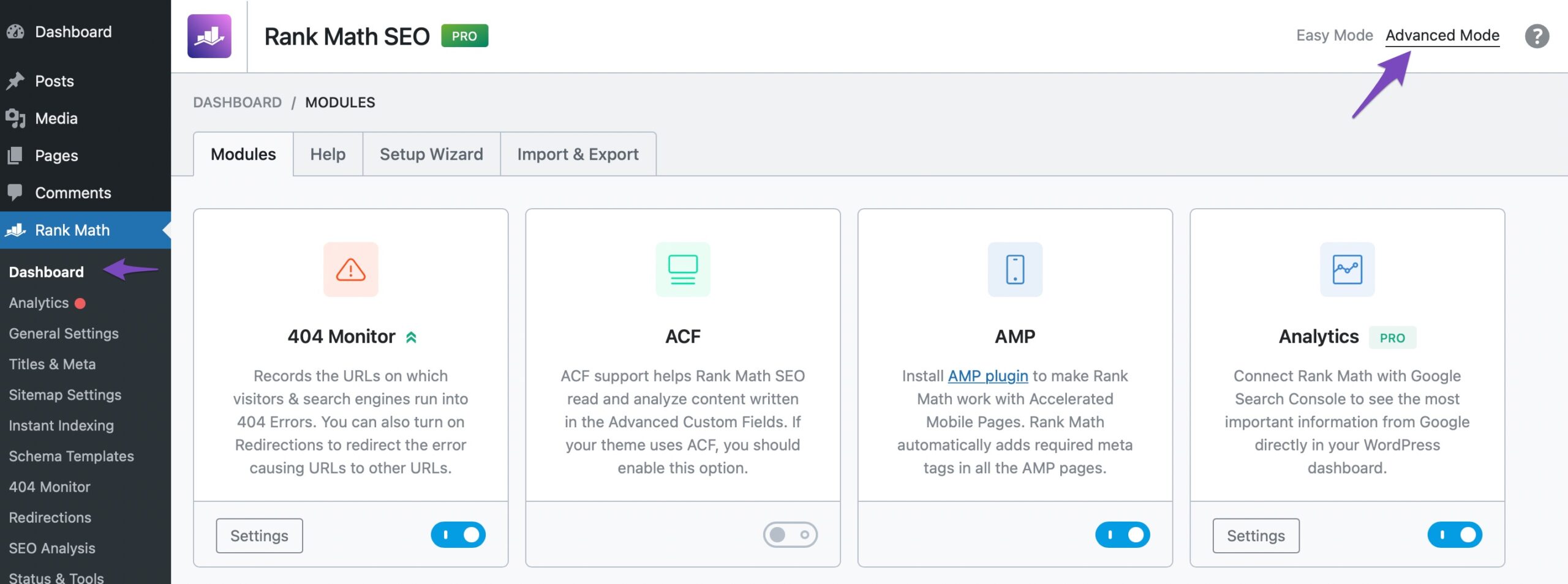
    Most likely you’re currently using Rank Math in Easy Mode. Please head over to Rank Math > Dashboard and switch to Advanced Mode in order to access the rest of other features of Rank Math.

    advanced mode

    Hope that helps, and please do not hesitate to let us know if you need our assistance with anything else.

    Thank you.

    Hello,

    Since we did not hear back from you for 15 days, we are assuming that you found the solution. We are closing this support ticket.

    If you still need assistance or any other help, please feel free to open a new support ticket, and we will be more than happy to assist.

    Thank you.

Viewing 1 replies (of 1 total)

The ticket ‘Nofollow links on website’ is closed to new replies.