Hello,
Thank you for contacting Rank Math and bringing your concern to our attention.
I’m assuming you’re referring to these options/buttons in your post list view:
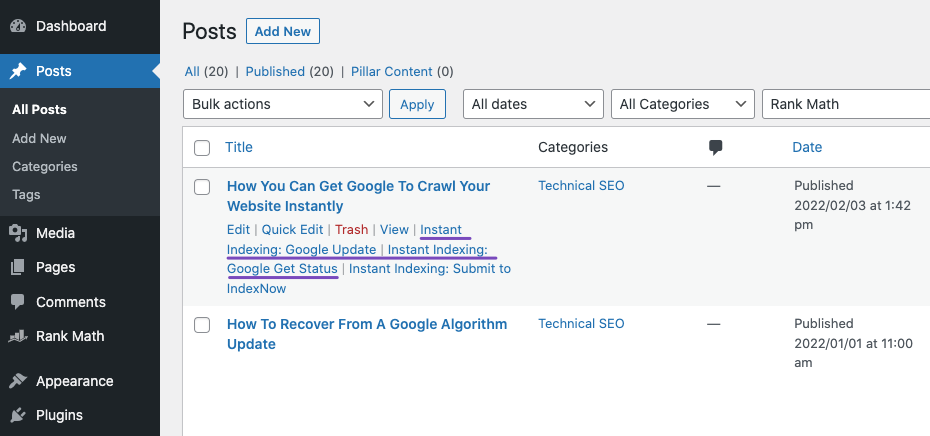
If so, both of the buttons are the same. However, Google Update is for Google, and Submit to IndexNow is for Bing and Yandex search engines.
You can check these links for your reference:
https://rankmath.com/blog/google-indexing-api/#send-first-request
https://rankmath.com/kb/how-to-use-indexnow/#submit-page
Hope that helps.
Thank you.
ok thanks, i remember reading in your guide that submitting to one search engine notifies all the others that participate…should i still always do both of these options?
when i publish a new post/page or update/edit an existing post or page it automatically pings all of them right?
also i noticed in that one image u linked to i dont have the ‘index now submit url’ check box its just these three
Action:
Google: Publish/update URL
Google: Remove URL
Google: Get URL status
Hello,
when i publish a new post/page or update/edit an existing post or page it automatically pings all of them right?
Yes, you need to specify the post type you wish for Rank Math to automatically submit to the indexing API when updated or published.
Please head over to your WordPress Dashboard > Rank Math > Instant Indexing > * API Settings.

also i noticed in that one image u linked to i dont have the ‘index now submit url’ check box its just these three
Action:
Google: Publish/update URL
Google: Remove URL
Google: Get URL status
Please head over to your WordPress dashboard > Rank Math > Dashboard > Modules and enable the Instant Indexing module to activate your IndexNow API:

Here’s a guide to configure it: https://rankmath.com/kb/how-to-use-indexnow/
Hope that helps and please do not hesitate to let us know if you need our assistance with anything else.
is there a paid version i can upgrade to to get those options as i dont see what you have in your screenshots…
heres what i see


Hello,
You are on the correct settings page. The reason we have a different list of options under the settings “Submit Posts to Google” because I have added different custom post types in my local WordPress installation.
Hope that helps and please do not hesitate to let us know if you need our assistance with anything else.
Hello,
Since we did not hear back from you for 15 days, we are assuming that you found the solution. We are closing this support ticket.
If you still need assistance or any other help, please feel free to open a new support ticket, and we will be more than happy to assist.
Thank you.



