Problem With Rankmath

#475086
  • Resolved Mithlesh Bairagi
    Rank Math free

    Hello sir I am using rankmath plugin for a long time, it was working very well but from few days my website traffic has become zero. And now I am not even able to recover the traffic, I am also seeing many errors, the url of my website is hindimaa . com Now as soon as I activate rankmath, the web stories page of my website does not open . [moved to sensitive data section] This URL does not open and as soon as I disable rankmath, this URL starts opening, still I have rankmath disabled. And you say raise the ticket for your problem but it is very difficult to do this on the support portal of rankmath, I am not able to raise the ticket, that’s why I have to mail me and there is another problem in your plugin which is I have already told which is related to instant indexing but till now it has not been solved either you solve your problem or I will have to shift to another SEO plugin and also my Category Pages Not opening when Rankmath is Enabled After Disable Rankmath Plugin My Website Working Well Please Provide a Perfect Solution for this error because after this errors my Google Search Console Showing many errors and my Traffic is Zero please Help me Fast and all time i am updated Rankmath To latest version but error not solved

Viewing 13 replies - 1 through 13 (of 13 total)
  • Hello,

    Thank you for contacting Rank Math and bringing your concern to our attention. I’m sorry for any inconvenience this issue may have caused you.

    I’ve checked your web stories URL, and it is getting a redirect loop error. In this case, please follow the steps in this link for initial troubleshooting:
    https://rankmath.com/kb/solving-redirection-issues-using-rank-math-seo/

    If the issue still persists, we might need to take a closer look at the settings. Please edit the first post on this ticket and include your WordPress & FTP logins in the designated Sensitive Data section.

    Please do take a complete backup of your website before sharing the information with us.

    Sensitive Data Section

    It is completely secure and only our support staff has access to that section. If you want, you can use the below plugin to generate a temporary login URL to your website and share that with us instead:

    https://wordpress.org/plugins/temporary-login-without-password/

    You can use the above plugin in conjunction with the WP Security Audit Log to monitor what changes our staff might make on your website (if any):

    https://wordpress.org/plugins/wp-security-audit-log/

    We really look forward to helping you.

    Thank you.

    Hello,

    I have updated the sensitive data as requested. Can you please check further?

    Thank you.

    Hello,

    Thank you for sharing the logins.

    Upon investigating, it seems that you have added redirects for these URLs (/web-stories and /web-stories/) that’s why it’s getting a redirect loop. I have attached a link in the sensitive data section where you can see the deactivated redirects which are the culprit of the issue.

    However, the page is already working. Please clear your website and browser’s cache if it’s still getting an error on your end.

    Hope that helps.

    Thank you.

    now my web stories URL problem is solved but now one more new problem happen my all url’s automatically redirected to Rankmath Debuger Page please solved this problem my all admin details i am already shared with you

    Hello,

    The Redirection debugger is only showing at the back end, and will not affect the redirects as it only shows a notice of the current redirect for the URL.

    Here’s a link for more information:
    https://rankmath.com/kb/solving-redirection-issues-using-rank-math-seo/#redirection-debug

    However, I’ve already disabled it on your site so you can visit the redirects normally again.

    Hope that helps.

    Thank you.

    but i dont want to show this debugger process in backend because i need to access feed URL so please solve my problme urgently

    Nigel
    Rank Math business

    Hello,

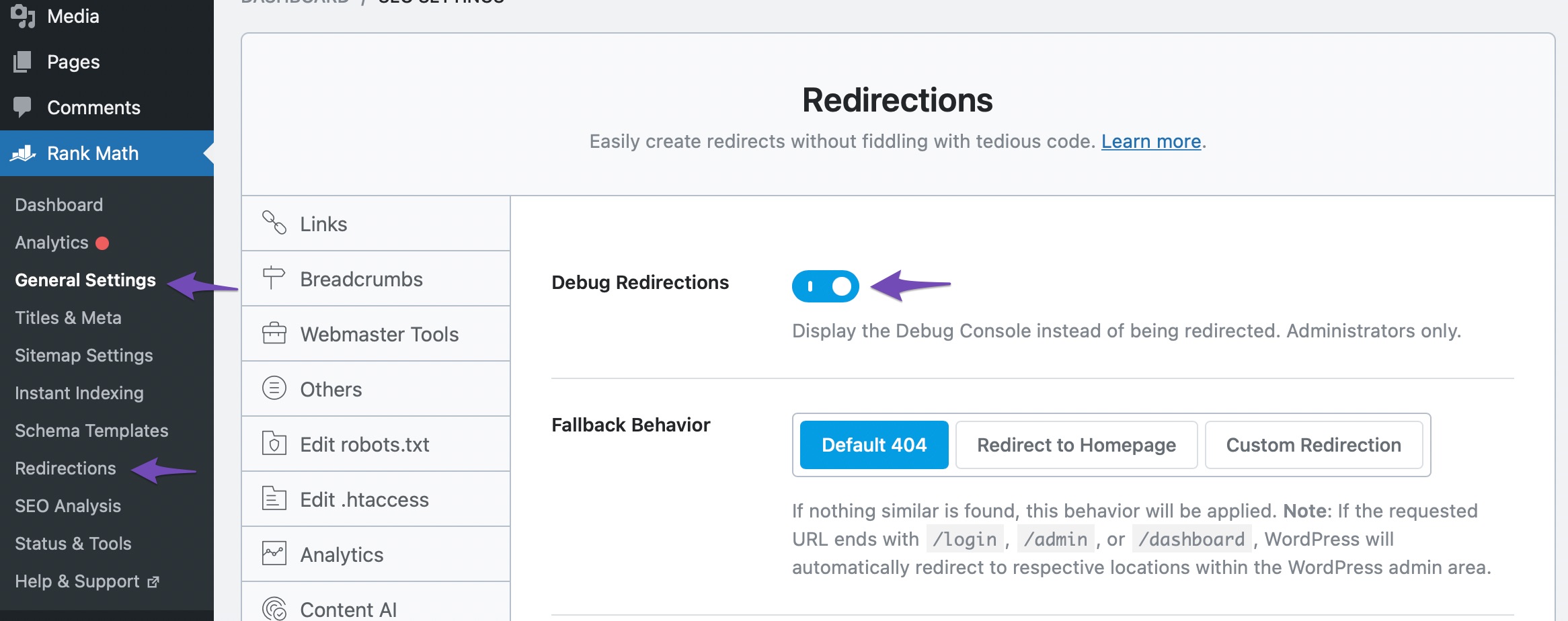
    I checked your website, and the redirections debugger has been disabled. If you need to enable it in future, you can go your WordPress dashboard > Rank Math > General Settings > Redirections and Toggle on “Debug Redirections”, then click “Save Changes”.

    Hope that helps. Please let us know if you have questions.

    Sorry but when I’m starting using Rankmath after day one day new problem found in my website and very big problem is support system of Rankmath support partner asking for admin credentials but not changing anything in error so why you asking for admin credentials if you really want to solve my problem then solve it I’m not want to read your blogs All time you give a problem link of rankmath plugin for solve it but I’m not want to solve it after read a very big article so please solve my problem if you don’t solve then tell me after my Uninstall Rankmath and install another SEO Plugin

    Hello,

    Could you please specify the problem you’re referring to?

    Please note that we have already fixed the redirect issue and the redirect debugger showing on your back end as mentioned in our previous replies.

    Looking forward to helping you.

    But I don’t want to show debugger on my backend

    Nigel
    Rank Math business

    Hello,

    The redirection debugger is already disabled.

    If you have other questions, please let us know.

    Yes I know it’s disabled but the redirection error stil showing check it

    Hello,

    We can’t seem to experience that issue on our end. Are you referring to the error shown at Google Search Console?

    Can you please share a screenshot of the issue so we can take a closer look at it? You may share the screenshot using the tool https://imgbb.com/

    Also, please clear your website and browser cache and see if the issue goes away.

    Looking forward to helping you.

    Hello,

    Since we did not hear back from you for 15 days, we are assuming that you found the solution. We are closing this support ticket.

    If you still need assistance or any other help, please feel free to open a new support ticket, and we will be more than happy to assist.

    Thank you.

Viewing 13 replies - 1 through 13 (of 13 total)

The ticket ‘Problem With Rankmath’ is closed to new replies.