Hello,
Thank you for contacting Rank Math support, and sorry for any inconvenience that might have been caused due to that.
Please contact your web host and ask them to set the following values:
PHP Memory Limit: 512M
Max input time: 150
PHP time limit: 120
PHP max input variables: 1000
After that, please run the importer again and see if the issue persists.
Let us know how that goes. Looking forward to helping you.
Hello,
I have updated the sensitive data as requested. Can you please check further?
Thank you.
Hello,
We might need to take a closer look at the settings. Please edit the first post on this ticket and include your WordPress & FTP logins in the designated Sensitive Data section.
Please do take a complete backup of your website before sharing the information with us.

It is completely secure and only our support staff has access to that section. If you want, you can use the below plugin to generate a temporary login URL to your website and share that with us instead:
https://wordpress.org/plugins/temporary-login-without-password/
You can use the above plugin in conjunction with the WP Security Audit Log to monitor what changes our staff might make on your website (if any):
https://wordpress.org/plugins/wp-security-audit-log/
We really look forward to helping you.
Hello,
I have updated the sensitive data as requested. Can you please check further?
Thank you.
Hello,
Thank you for your patience.
From the log you have shared, it seems that you have also selected the data from AIO, but you have mentioned you’re importing from Yoast only
[17:39:34] Importing postmeta from AIO Schema Rich Snippet
In this case, please try importing in Rank Math > Status & Tools > Import & Export > Other Plugins, then under the Yoast SEO column, click the Import button.
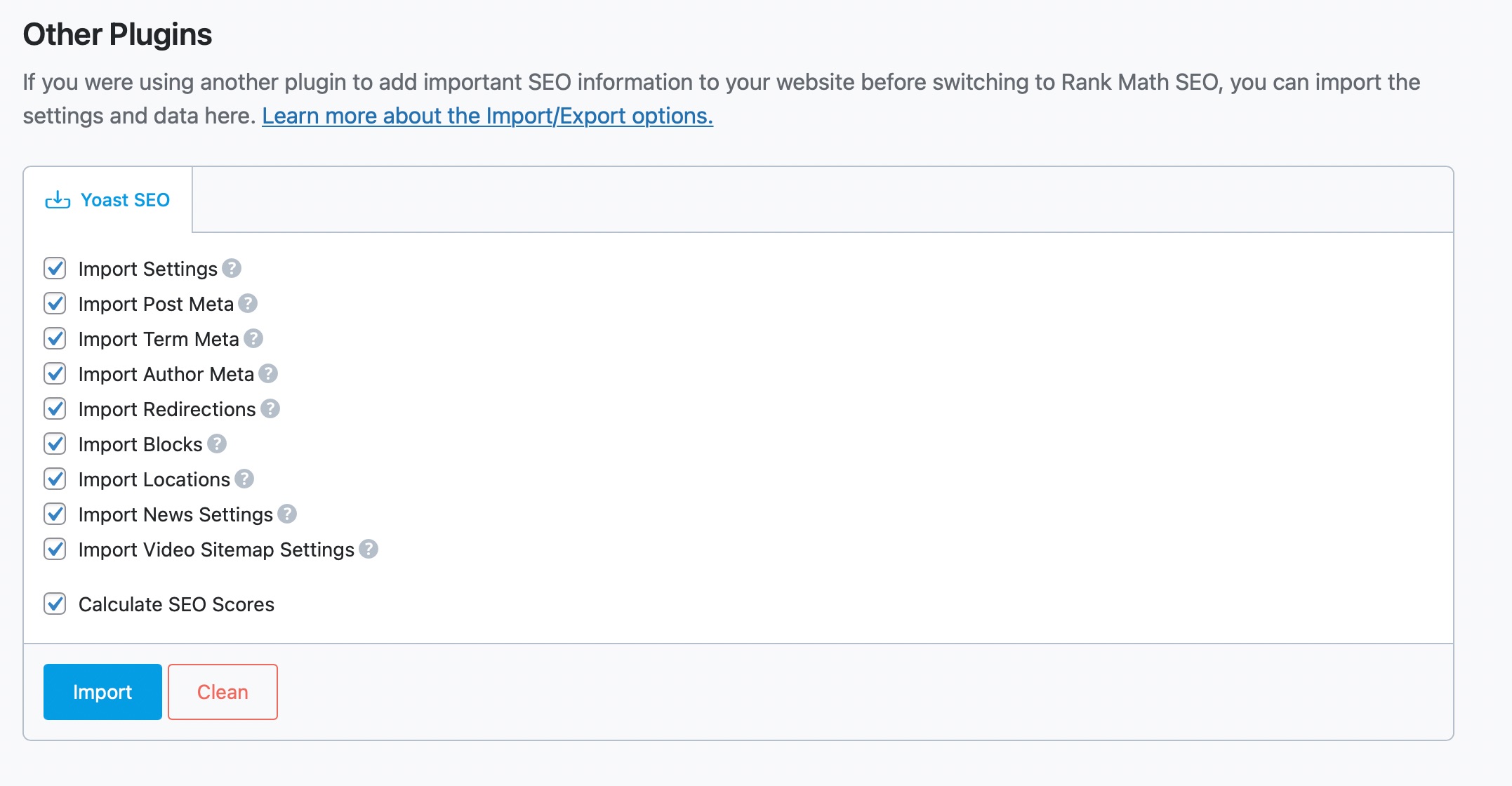
Let us know how this goes.
Thank you.
That appears to have worked for importing the Yoast data. Thank you.
But if RankMath is as complete as WP Schema Pro then I would also like to import that data to instead run schema from Rankmath.
But it appears that is where the problem is happening. When I follow your same recommended steps for importing WP Schema Pro’s data, it gives an error message in the log right after “Starting SEO score recalculation”.
It appears I may need to run schema from WP Schema Pro rather than starting from scratch with no imported data for Rankmath.
Does RankMath offer the Review Schema? https://schema.org/Review
I don’t see it as an option in the pulldown and it would be ideal for our testimonial/service review pages.
Hello,
Recalculating the SEO score is not a necessary step in the schema import. I managed to import the schema data with score recalculation toggled off. Screencast: https://i.rankmath.com/v/7EGuLu
If you still wish to recalculate SEO score, you can follow step 3 in this guide: https://rankmath.com/kb/seo-score-not-available/#database-tools
Hope that helps. Please let us know if you have questions.
Thanks Nigel! All set now.
Hello,
We are super happy that this resolved your issue. If you have any other questions in the future, know that we are here to help you.
Thank you.
Hello,
Since we did not hear back from you for 15 days, we are assuming that you found the solution. We are closing this support ticket.
If you still need assistance or any other help, please feel free to open a new support ticket, and we will be more than happy to assist.
Thank you.



