Hello,
Thank you for contacting Rank Math.
Can you please share a screenshot showing the column that you want to delete?
You can use https://imgbb.com/ to share screenshots.
We look forward to helping you.
Hello,
Ok…
It displays my products as blog posts…that’s why I want to remove this column.
https://ibb.co/NSpXcGS
Merci
Hello,
Our plugin doesn’t control the display of that column. You would need to reach out to your theme author on how to disable or remove that section. That could be a widget or hard-coded into your theme’s template.
Please do not hesitate to let us know if you need our assistance with anything else.
Thank you.
Hello,
Ok but what’s weird is that this right column disappears when I deactivate your plugin….So if I don’t find another solution, I’ll delete Rank, it’s not serious.
Thanks
Corinne
Hello,
Could you please let us know the name of the theme you are currently using?
We would like to reproduce it on our end.
Looking forward to helping you.
Hello,
It’s Divi Version : 4.18.0
Par Elegant Themes
Thank you
Corinne
Hello,
Please check if this option is available on your site to remove the sidebar on your archive pages
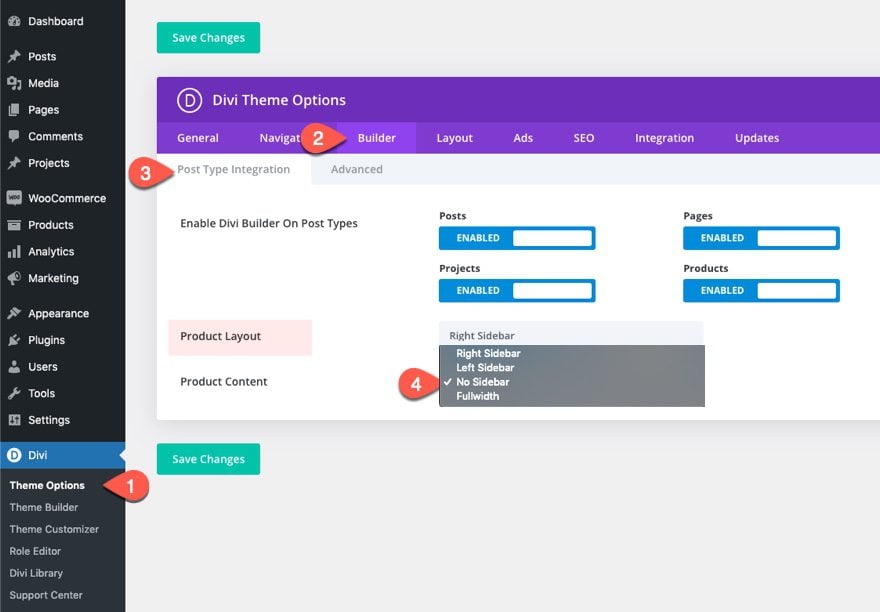
Here’s a link for more information:
https://www.elegantthemes.com/blog/divi-resources/how-to-remove-sidebars-from-divi
If the issue still persists, we might need to take a closer look at the settings. Please edit the first post on this ticket and include your WordPress & FTP logins in the designated Sensitive Data section.
Please do take a complete backup of your website before sharing the information with us.

It is completely secure and only our support staff has access to that section. If you want, you can use the below plugin to generate a temporary login URL to your website and share that with us instead:
https://wordpress.org/plugins/temporary-login-without-password/
You can use the above plugin in conjunction with the WP Security Audit Log to monitor what changes our staff might make on your website (if any):
https://wordpress.org/plugins/wp-security-audit-log/
We really look forward to helping you.
Thank you.
Hello,
Thanks but my configuration is on No sidebar.
I won’t spend more time on this bug, nor will I make you waste more time too.
It’s ok, I will uninstall the plugin.
I don’t want to give my login information either.
I thank you for the time spent trying to solve this bug.
Sincerely, Corinne
Hello,
We apologize if our plugin causes unexpected behavior that caused an issue with your website.
Of course, we regret to see you go but if you need our assistance with anything else, just let us know here.
Thank you.
Hello,
Since we did not hear back from you for 15 days, we are assuming that you found the solution. We are closing this support ticket.
If you still need assistance or any other help, please feel free to open a new support ticket, and we will be more than happy to assist.
Thank you.



