
-
Hello,
We’re happy with RankMath so far and would like to know is there a way to set up the WooCommerce Product Open Graph Meta Tags within the setting?
“Title & Meta” -> “Products” -> “Schema Type” has been enabled as “WooCommerce Product”, but we could see the OG-Meta tags on the product page’s code.
Thanks so much.

-
Hello,
Thank you for contacting Rank Math and bringing your concern to our attention. I’m sorry for any inconvenience this issue may have caused you.
To change the Opengraph image (og:image) meta tag on your site, you can navigate Social Settings by clicking on the Social Tab upon editing your products
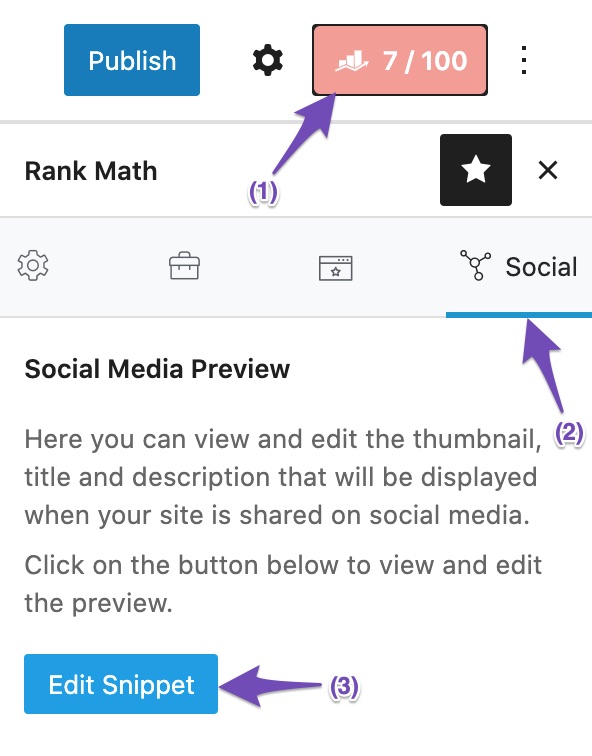
I hope that helps.
Thank you.
Hello Reinelle,
Thanks for the response.
But we’re looking for an option to enable/configure the WooCommerce Product attributes, such as:
“product:brand”, “product:availability”, “product:price:amount”, “product:price:currency” …etcThanks again.
Hello,
Rank Math automatically adds those meta tags to the Products, for the brand, you need to add this filter:
https://rankmath.com/kb/woocommerce-custom-brand-schema/#how-to-set-custom-brand-name-using-filterOn your website, the values are added in the Schema but the meta tags are not added, assuming you are using the latest version of all the plugins and the themes (please update if not yet), it would seem like a conflict with one of the plugins or the theme you are using.
To determine that, please follow this troubleshooting guide:
https://rankmath.com/kb/check-plugin-conflicts/Here is a video you can follow as well: https://www.youtube.com/watch?v=FcIWRhcUP2c
Only the site admin would know and your users won’t be affected by this troubleshooting.
If the issue persists, please edit the first post on this ticket and include your WordPress & FTP logins in the designated Sensitive Data section.
Please do take a complete backup of your website before sharing the information with us.
It is completely secure and only our support staff has access to that section. If you want, you can use the below plugin to generate a temporary login URL to your website and share that with us instead:
https://wordpress.org/plugins/temporary-login-without-password/
You can use the above plugin in conjunction with the WP Security Audit Log to monitor what changes our staff might make on your website (if any):
https://wordpress.org/plugins/wp-security-audit-log/
Please do take a complete backup of your website before sharing the information with us.
We really look forward to helping you.
Hello Anas,
Great thanks for the detailed instruction.
I’ve run the Health Check session and activated the least plugin, yet the issue is still here.3rd party plugin activated in troubleshooting mode:
Theme Actived: Twenty Twenty
Plugin Actived: WooCommerce, RankMathUpdated the site admin credentials on Sensitive Data.
Thank you very much.
Hello,
I was able to replicate the issue, but even with troubleshooting mode and with only Rank Math and Woocommerce plugin activated, the issue persists.
Much more strange is even adding a filter to forcibly add the tag, the tags won’t just show up.
Is it possible for you to create a staging website for us to deeply debug the issue without worrying about breaking your live site? If so, please create one, replicate the issue there and share the admin login here so we can further determine what’s causing this issue.
Looking forward to helping you on this one. Thank you.
(Sensitive Data Updated)
Hello Jeremy,
Thanks so much for your help and reply.
I’ve created a staging site (updated the URL under Sensitive Data session), feel free to login with the same set of credentials and be my guest!Thanks again.
Hello,
Thank you so much for sharing the staging site.
Unfortunately, the tags aren’t still generated on the frontend and I can’t replicate the issue on my end. This issue may be specific to your setup.
With that said, kindly apply this filter to your live website instead:
add_action( 'rank_math/head', function() {
  if ( ! is_product() ) {
      return;
  }

  global $product;
  echo '<meta property="product:price:amount" content="'.wc_get_price_including_tax( $product ).'" />';
  echo '<meta property="product:price:currency" content="'.get_option('woocommerce_currency').'" />';
}, 99 );
This is an alternative filter that should forcibly generate the required tags.
Let us know how that goes on your end.
Looking forward to helping you.
Hello Jeremy,
Thanks for the help, I’ll try the filter in a moment.
Do you think the issue could be caused by our configuration of Rank Math? Or the connection of some tracking code (Google Analytics 4 or Facebook Pixel)?
Since the first thing I noticed when I login to the staging is all those tracking services are disconnected, not sure if this caused the difference.
We’re considering to subscribe a plan of Rank Math the day before until we discover this issue, we would like to find out the cause before we make the subscription.
Thank you very much.
Hello,
Thank you so much for your input, I have shared this issue with our dev team so we can determine what may be hindering the generation of the meta tag. We should get back to you shortly with an update or some advice.
With that said, for now, you can use the filter I shared and ensure that the staging website is always up so our development team can check it.
Looking forward to helping you. Thank you.
Hello,
I just got word from our developer that we actually don’t generate these tags on variable products as these products display multiple prices.
In addition to that, we don’t generate these tags for products that aren’t published and also for private or password-protected products.
Hope that helps and please do not hesitate to let us know if you need our assistance with anything else.
Hello Jermy,
Deeply appreciate your speedy response & help.
That means other than “product:brand” is available on add-a-filter or a subscription, tags like
– “product:category”
– “product:price:currency”
– “product:price:amount”
..etc are not available once it’s a variable product, right?Thanks so much again.
Hello,
For the product brand tag, you need to follow this guide as previously mentioned by my colleague.
The rest of the
product:*tags are not generated for a variable product.Hope this clarifies any doubt.
Please do not hesitate to let us know if you need our assistance with anything else.
Thank you.
Great thanks Jeremy and the RankMath team.
Appreciate all the help and advice.
Have a great weekend!Hello,
We are super happy that we could address your concern. If you have any other questions in the future, know that we are here to help you.
If you don’t mind me asking, could you please leave us a review (if you haven’t already) on https://wordpress.org/support/plugin/seo-by-rank-math/reviews/#new-post about your overall experience with Rank Math? We appreciate your time and patience.
If you do have another question in the future, please feel free to create a new forum topic, and it will be our pleasure to assist you again.
Thank you.


The ticket ‘WooCommerce Product OG Meta tags’ is closed to new replies.