Hello,
Thank you for contacting Rank Math and bringing your concern to our attention. I’m sorry for any inconvenience this issue may have caused you.
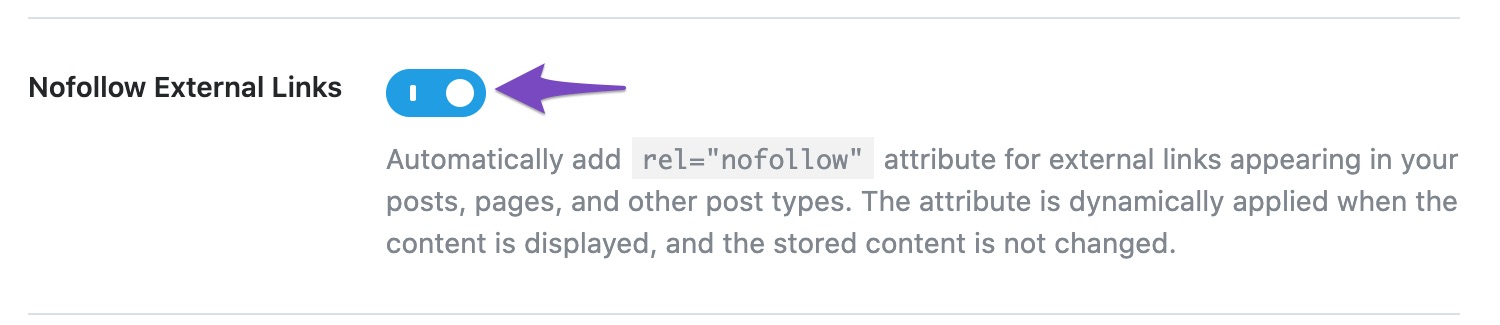
Could you please ensure if the Nofollow External Links option is enabled in Rank Math > General Settings > Links?
Looking forward to helping you on this one.
Hi Jeremy,
I checked the button was active. But, why I still found “We found 1 outbound links in your content and all of them are nofollow”.
Here is the attached
https://prnt.sc/fpg3jJKqW_dz
Thank you
Jimmy Bharata
Hello,
Please note that not all external links should be set to no-follow. We’ve added that option to make it easy to nofollow a lot of links, but not with the intention of no-following every external link.
To pass this test, please ensure that at least one of your external links is set to follow:
https://rankmath.com/kb/score-100-in-tests/#linking-to-external-content-with-a-followed-link
If you have enabled the Nofollow External Links option at Rank Math > General settings > Links, the nofollow attribute will be added to all the external links on your website.
To make a link dofollow, you can override “rel=nofollow” to a particular link by editing the anchor text as HTML.
Go to your post > Select the anchor text > Edit as HTML > In tag add rel=”follow” > Save
We are aware that rel=follow is not the correct rel-tag, but it is the only way to make it work.
The other way would be to add the domain to the whitelist at WordPress Dashboard > Rank Math > General Settings > Links. Then, all links to that particular external domain will not be nofollowed.
https://rankmath.com/kb/general-settings/#no-follow-exclude-domains
I hope that helps.
Thank you.
Dear RankMath team,
Thank you for your explanation. But, still the indicator still pink colour.
[moved to sensitive data section]
Thank you
Jimmy,-
Hello,
I tried checking this one over your admin dashboard. However, the admin login you shared doesn’t seem to work.
Can you please check it so we can further debug the issue?
Looking forward to helping you.
Dear Support,
this is the revision access.
Thank you
Hello,
I was able to login into your website’s admin area and as you’ve enabled the Nofollow External Links option since all the outbound links are by default nofollowed, the test automatically fails.
You can either disable that option or make use of the Nofollow Domains and Nofollow Exclude Domains options under Rank Math > General Settings > Links, to only nofollow (or exclude) the desired domains.
I went ahead and added youtube.com to the Nofollow Exclude Domains field and the test is passed without any issues. Please have a look at the screencast in the sensitive data section of this ticket for a quick reference.
Hope that helps.
Thank you.
Hi Support,
I found the bugs in your plugin RankMath
If I fill the anchor with address share of youtube with https://youtu.be/8XU3uMu4WvQ, the indicator still red,
and if I fill the anchor with playlist
https://www.youtube.com/watch?v=8XU3uMu4WvQ&list=PLjXhQ1-X1IVNTQBjN-9Y-_wtWxY56T-17&index=4
the indicator will be green OK
Give me clue for this issue, so we can fill outbound links with share URL from Youtube.
https://prnt.sc/LQBA5MCnAVBv
Thank you
Jimmy Bharata
Hello,
That is not a bug, as mentioned previously, you’ll have to add all the domains to be excluded in the Nofollow Exclude Domains option.
If you’ll observe those URLs closely, you’ll note that both of them have different domains. One is youtu.be and the other one is youtube.com. So, you’ll need to add both these URLs in the above option. I tested this on my end and it seems to be working just fine.
I went ahead and added the youtu.be domain in the above option. Please check if the test is passed in the desired page.
Let us know how that goes.
Hello,
Since we did not hear back from you for 15 days, we are assuming that you found the solution. We are closing this support ticket.
If you still need assistance or any other help, please feel free to open a new support ticket, and we will be more than happy to assist.
Thank you.



