
-
I have tried to implement GTIN on the products, I have added value but it is not being picked up by Google or any other structured data testing tool. I have added GTIN on product page, but it’s not working. Please check the sensitive data for more information

-
Hello,
Thank you for contacting the support, and sorry for any inconvenience that might have been caused due to that.
I checked one of your products with a GTIN added from the backend and tested them in both Rich Result and Schema Markup Validator. They seem to show the GTIN as you can see from the screenshots I inserted in the Sensitive Data section.
Is this happening only on specific products? If so, please share those product URLs here.
Looking forward to helping you with this one. Thank you.
You have checked a Simple product, But How schema will work for the Variations?
Also, Which product you have checked is not on the sale, but it’s still showing a Warning “PriceValidUntil”. It should be on the product with sales? Shouldn’t it?
Please check screenshots in sensitive data.
Screenshot 1: Variable Product GTIN Issue
Screenshot 2: Simple product (Not on Sale) but showing a warning of “pricevaliduntil”Hello,
You will need to add the below code to your function.php file to fix the GTIN value.
add_filter( 'rank_math/snippet/rich_snippet_product_entity', function( $entity ) {
    $product = new WC_Product( get_the_ID() );
    if( $product->is_type( 'variable' ) ){
		$variation = new WC_Product_Variation(get_the_ID());
		$gtin_value = get_post_meta($variation->get_id(),'_wpm_gtin_code', true);
		$entity['gtin8'] = $gtin_value;
		return $entity;
    }else{
         return $entity;
    }

});
For the “priceValidUntil,” you need to either ignore or add a sale price with validity to get rid of it:
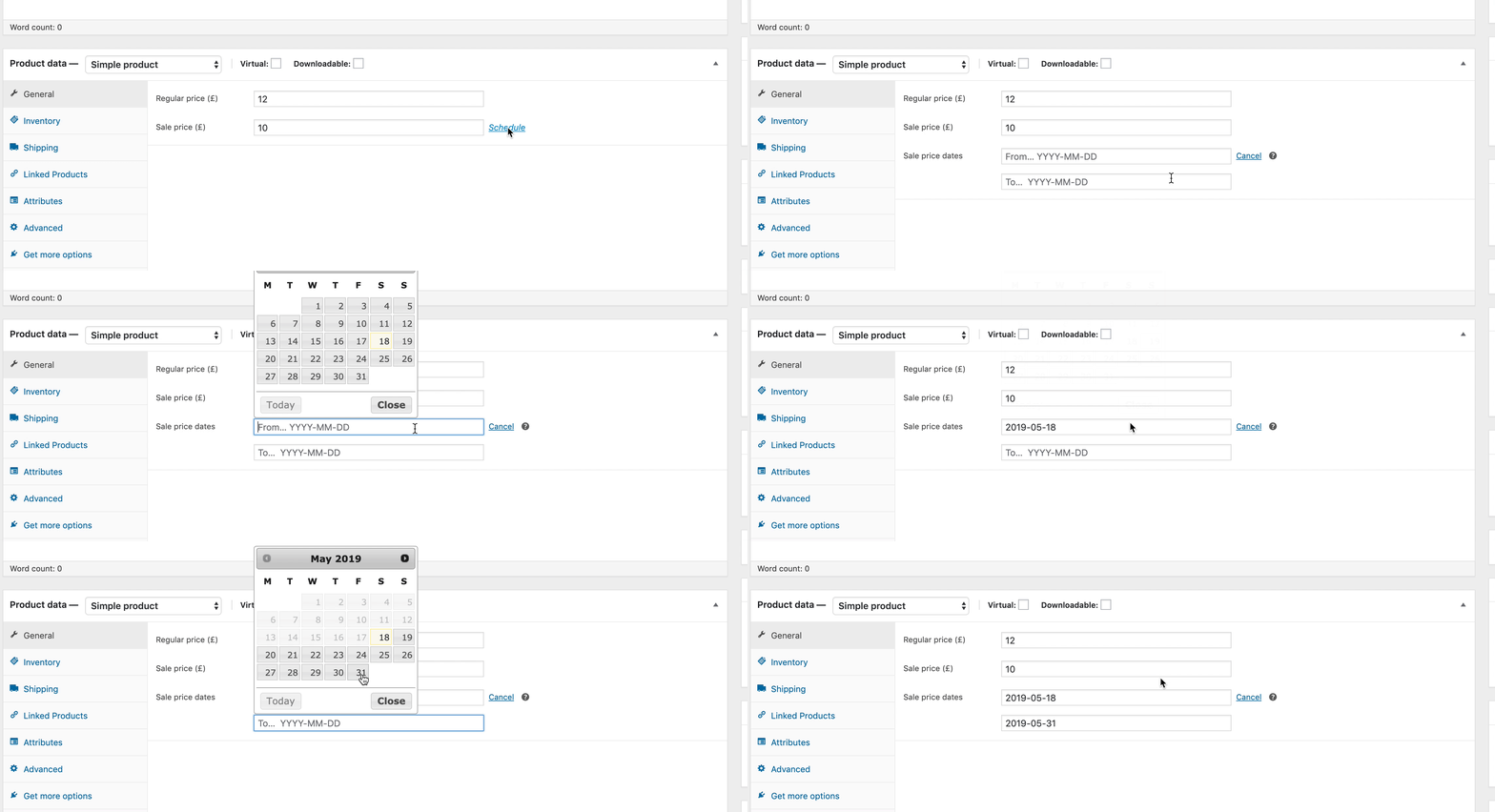
Hope that helps and please do not hesitate to let us know if you need our assistance with anything else.
Thank you!
But the code is not working. I can still see same gtin warning on the variable products.I have shown screenshot in sensitive data.
Hello,
Can you please clear your website cache and check it again?
If the issue persists, we may need to check this one over your admin dashboard. Please edit the first post on this ticket and include your WordPress login in the designated Sensitive Data section.
Please do take a complete backup of your website before sharing the information with us.
It is completely secure and only our support staff has access to that section. If you want, you can use the below plugin to generate a temporary login URL to your website and share that with us instead:
https://wordpress.org/plugins/temporary-login-without-password/
You can use the above plugin in conjunction with the WP Security Audit Log to monitor what changes our staff might make on your website (if any):
https://wordpress.org/plugins/wp-security-audit-log/
We really look forward to helping you.
Hello,
I have updated the sensitive data as requested. Can you please check further?
Thank you.
I have already shared these details in the sensitive data, Please check.
Hi,
It’s been 24 hours and no reply.Hello,
I tried to log in to your site but the login details are not working:
Please check and provide working login details so we can check and assist you further.
Looking forward to helping you.
It’s working now!
Please check againHi Good Day!
Please let me know if you are able to check?Hello,
I can check that you are using Rank Math PRO on your site to add the GTIN to your products but your subscription status is showing as a Free user in our forum. Can you please share the email address that you used to purchase the PRO version?
Looking forward to helping you.
Thanks.
I didn’t activate Rank math pro, It’s just installed but not connected.
Can you please proceed with free version?Hello,
Adding the GTIN to products is a feature of Rank Math PRO. Since you don’t have a subscription, please deactivate the GTIN feature from Rank Math and use a plugin like: https://wordpress.org/plugins/product-gtin-ean-upc-isbn-for-woocommerce/
The filter that my colleague has provided is for Free users and should work fine with this plugin.
Let us know how that goes. Looking forward to helping you.
Thanks.
The plugin you have provided will work for the Variations as well? RIght?
Hello,
Since we did not hear back from you for 15 days, we are assuming that you found the solution. We are closing this support ticket.
If you still need assistance or any other help, please feel free to open a new support ticket, and we will be more than happy to assist.
Thank you.



The ticket ‘GTIN is now Showing’ is closed to new replies.