Hello,
Thank you for contacting Rank Math, and sorry for any inconvenience caused.
Rank Math takes the schema data from your product pages automatically and turns it into Schema-ready content. Likewise, the aggregateRating and review fields are taken from your actual product reviews that your buyers/customers leave on your products.

If you don’t have any reviews yet, that is going to show up as a warning in the schema testing tool. That’s because Google will actually look for those fields.
Please acquire some reviews and ratings to get rid of the aggregateRating and review warnings.
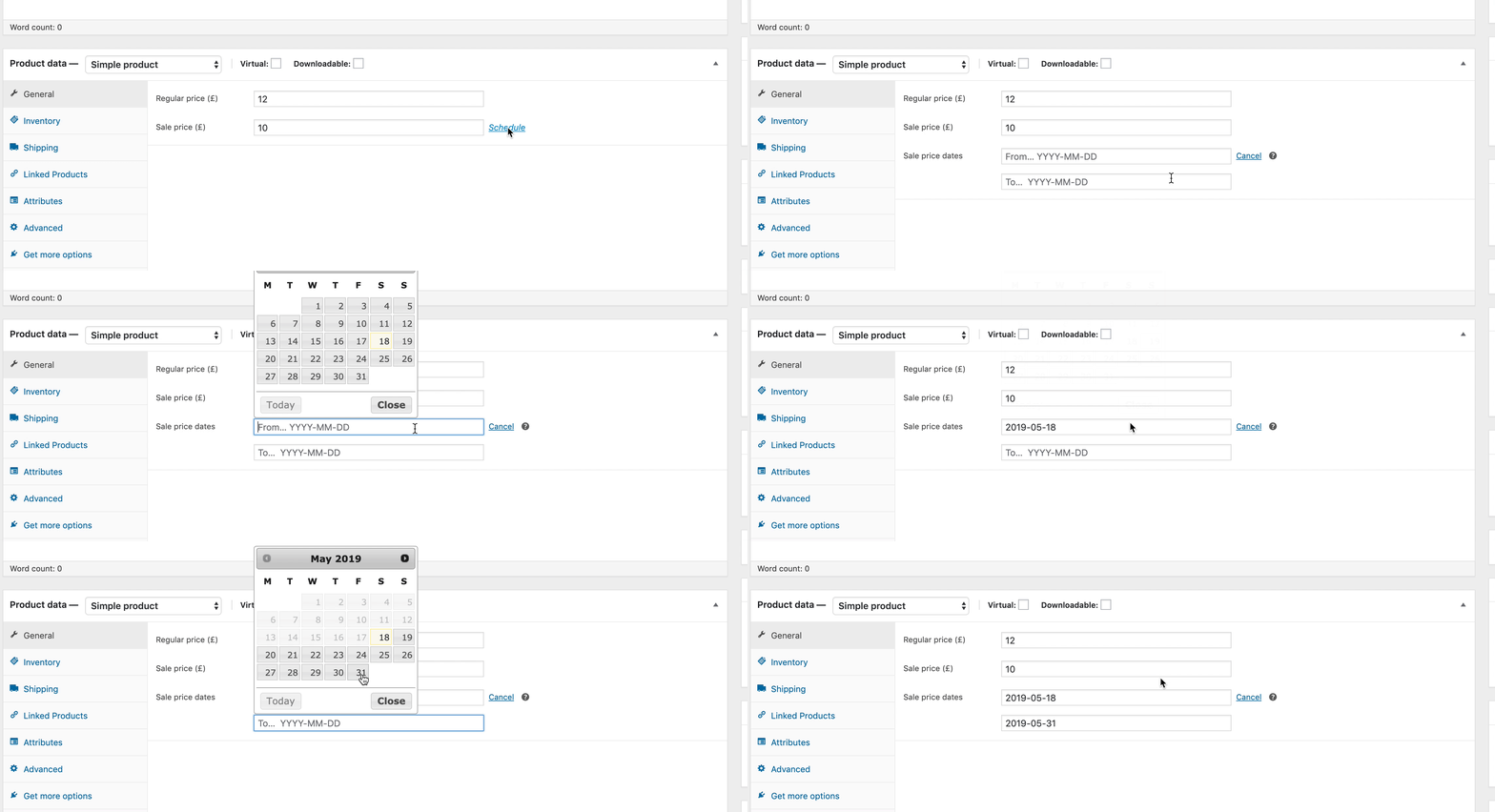
For the “priceValidUntil,” you need to either ignore or add a sale price with validity to get rid of it:
No global identifier provided (e.g. gtin, mpn, isbn) is a warning and that will not affect your SEO. If you still wish to include it inside your schema then you need to use the following filter and modify it according to your needs:
/**
 * Filter to change the schema data.
 * Replace $schema_type with schema name like article, review, etc.
 * @param array $entity Snippet Data
 * @return array
 */
add_filter( "rank_math/snippet/rich_snippet_product_entity", function( $entity ) {
	$entity['mpn'] = $entity['sku'];
	return $entity;
});
Hope that helps and please do not hesitate to let us know if you need our assistance with anything else.
Hi Ankit,
Thank you for the prompt response.
What happens to my page ranking as a result of these warnings? Is it affected or is this just informational?
1. Is it possible to disable the reviews check until I have some product reviews?
2. The item it is referring to is not on sale and so there is no point in adding a sale price date range. How do I get Google to ignore this field for products that are not on sale?
3. Is there a way to tell Google to ignore this?
Hello,
Thank you for your reply.
1. Is it possible to disable the reviews check until I have some product reviews?
You can disable the schema for the posts where you have no reviews, but that is not the optimal solution. Well, You don’t have to worry about it, though, because Google knows that the product has zero reviews, and the warning is just for developers, not for the user.
2. The item it is referring to is not on sale and so there is no point in adding a sale price date range. How do I get Google to ignore this field for products that are not on sale?
As I said earlier , for the “priceValidUntil,” you need to either ignore or add the date.
3. Is there a way to tell Google to ignore this?
The Schema test itself suppose to give us the errors/suggestion/validation to the developers, and those are just warnings and can be ignored because they will not impact your SEO.
Hope that helps and please do not hesitate to let us know if you need our assistance with anything else.
Hi Ankit,
Thank you for clarifying. I will ignore the warnings for now.
You can close the ticket.
Hello,
Glad that helped.
Please feel free to reach out to us again in case you need any other assistance.
We are here to help.
Thank you.


