Hello,
I apologize for the issue you are facing with your website not showing SEO details like keywords and schema. To help resolve this, please ensure that you have properly configured the Rank Math plugin settings. Here are a few steps you can follow:
-
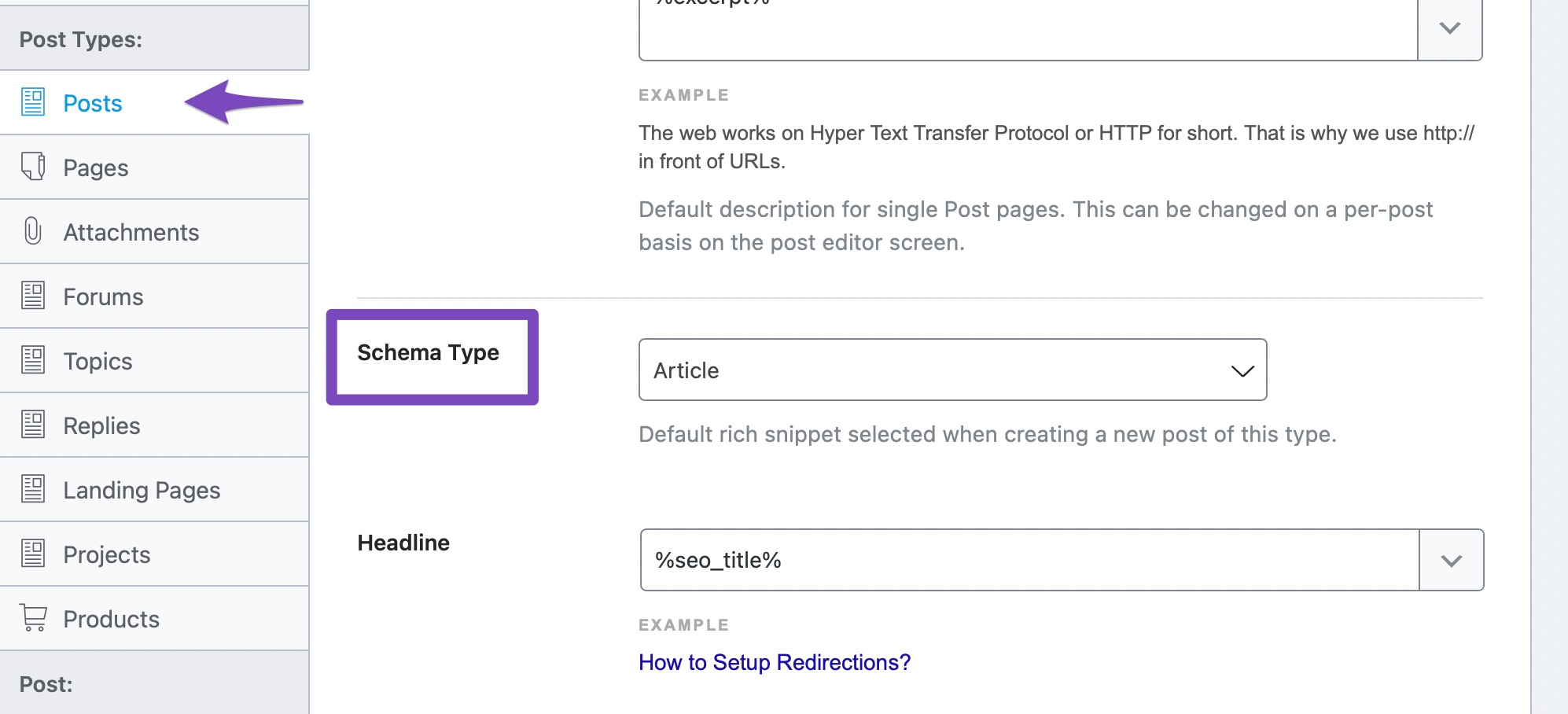
Check Schema Settings: Go to Rank Math SEO → Titles & Meta and ensure that you have selected the appropriate Schema type for your posts and pages. This is crucial for displaying schema data correctly.
-
SEO Analysis: You can use the SEO Analysis tool to identify any issues with your site’s SEO setup. More information on this can be found in our guide here: SEO Analysis Tool.
-
Schema Markup: Make sure that the Schema module is enabled in Rank Math. You can find more details on configuring Schema Markup in our guide: Configuring Schema Markup.
If you continue to experience issues, please reply to this ticket with any specific error messages or details about what you see, and a human agent from our support team will assist you further.
Thank you for raising this concern!
Sources:
Analyzing Your Site’s SEO with Rank Math’s SEO Analysis Tool
Configuring “Schema Markup” in Rank Math for Rich Snippets » Rank Math
This is an automated reply from Rank Math Support Bot. If you need further assistance, please reply to this topic and a human support agent will reply to you shortly.
Hello,
Since we did not hear back from you for 15 days, we are assuming that you found the solution. We are closing this support ticket.
If you still need assistance or any other help, please feel free to open a new support ticket, and we will be more than happy to assist.
Thank you.


