
-
I also cannot “edit” existing redirects.

-
Hello,
We apologize for the issue you are facing with the "Add New" button for creating redirects and the inability to edit existing redirects. This could be due to a few reasons, such as plugin conflicts or settings that need to be adjusted.
Here are a few steps you can take to troubleshoot this issue:
- Check User Permissions: Ensure that your user role has the necessary permissions to create and edit redirects in Rank Math.
- Plugin Conflicts: Deactivate other plugins temporarily to see if there is a conflict causing this issue.
- Theme Conflicts: Switch to a default WordPress theme (like Twenty Twenty-One) to check if your current theme is causing the problem.
- Clear Cache: If you are using a caching plugin, clear the cache and check again.
- Update Rank Math: Ensure that you are using the latest version of Rank Math. If not, update it from your WordPress dashboard.
If these steps do not resolve the issue, please reply to this ticket with your site URL so that a human agent from our support team can assist you further. Thank you for raising this concern!
Hello,
Thank you for contacting us, and sorry for any inconvenience that might have been caused.
Please check that you are using the latest version of the Rank Math plugin on your website: https://rankmath.com/changelog/. The latest version of the Rank Math Free version is 1.0.255.
If you don’t see the new update, please head over to WordPress Dashboard > Rank Math SEO > Status & Tools > Database Tools and clear the transients.
Then, proceed to WordPress Dashboard > Plugins and check if you are able to see a new version of the plugin, which you can update to. This should correct the issue after performing the update.
If the issue persists, please share the system status data by going to WordPress Dashboard > Rank Math SEO > Status & Tools > System Status and click on the “Copy System Info to clipboard” button and paste the copied information here.

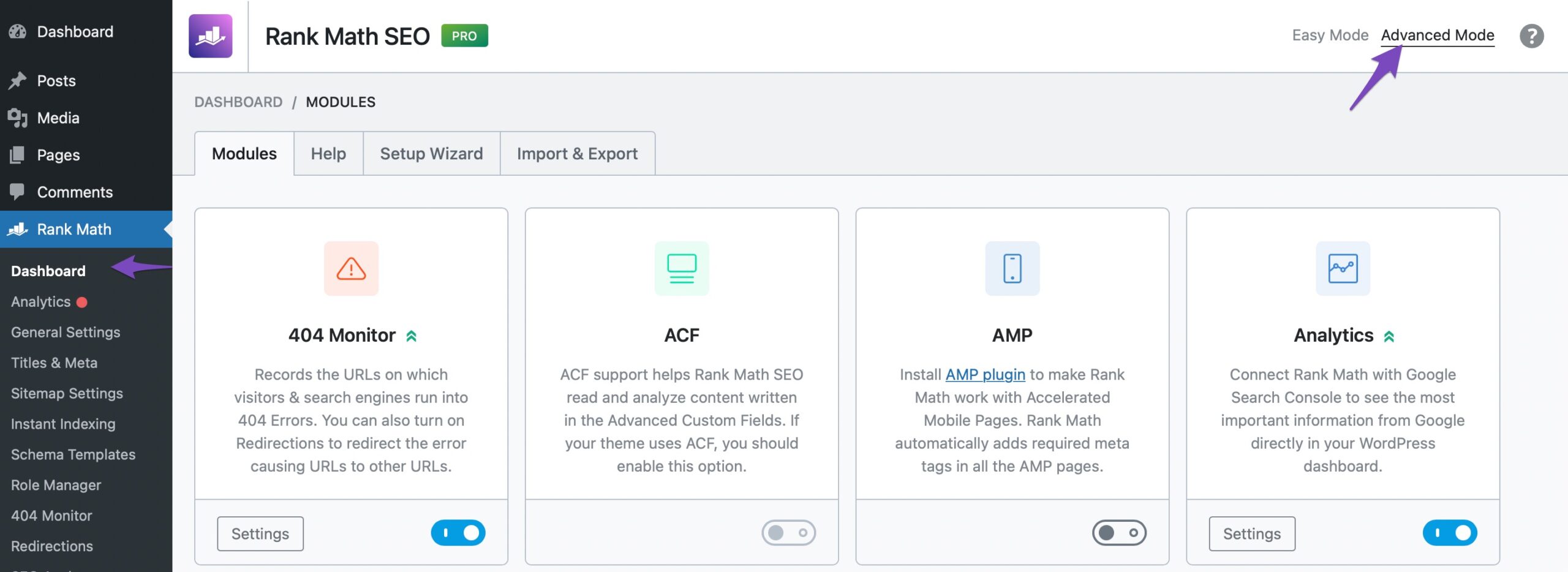
If this option is not available in your dashboard, you must have chosen to use the Easy Mode. Please navigate to WordPress Dashboard → Rank Math SEO → Dashboard. In the top-right corner, click on Advanced Mode, as shown below:
We look forward to hearing from you.
Followed you directions.
This popup came up:<p>There has been a critical error on this website.</p><p>Learn more about troubleshooting WordPress.</p>
NO system info was copied.
Have you been affected by the AWS outage?
Hello,
You must have received an email from WordPress with the details about the error. Please share it with us here so we can check and assist you further.
If you haven’t received the email with the error code, you can follow this guide to enable debugging in WordPress
https://wordpress.org/support/article/debugging-in-wordpress/ or you can get in touch with your web host, and they will help you locate the log file.Having an error log will help us determine what is causing the critical error on your website.
You can trigger again the error so the log would be updated.
Looking forward to helping you.
Thank you.
Hello,
Since we did not hear back from you for 15 days, we are assuming that you found the solution. We are closing this support ticket.
If you still need assistance or any other help, please feel free to open a new support ticket, and we will be more than happy to assist.
Thank you.


The ticket ‘Redirection “Add New” button is not showing option to create new redirects’ is closed to new replies.