
-
Hi, when putting a seo description for categories of products, they dont keep the html tags for seo titles. They keep it for some minutes, but then it becomes plain text: https://trulocktheshop.com/camisetas-y-sudaderas-para-mujer/

-
Hello,
We apologize for the issue you are facing with the category description not retaining the HTML format for SEO title tags. This can sometimes happen due to various reasons, including plugin conflicts or JavaScript-related errors.
Here are a few steps you can take to troubleshoot this issue:
-
Check for Plugin Conflicts: Sometimes, other plugins may interfere with Rank Math’s functionality. You can follow our guide on checking for plugin conflicts to identify any potential issues.
-
Inspect JavaScript Errors: JavaScript-related errors can also cause problems with saving settings. You can diagnose these errors by checking the JavaScript Console in your browser. Here’s how to do it in Chrome:
- Open Developer Tools by navigating to More Tools → Developer Tools from the Chrome menu.
- Click on the Console tab to see if there are any errors that might be affecting the functionality.

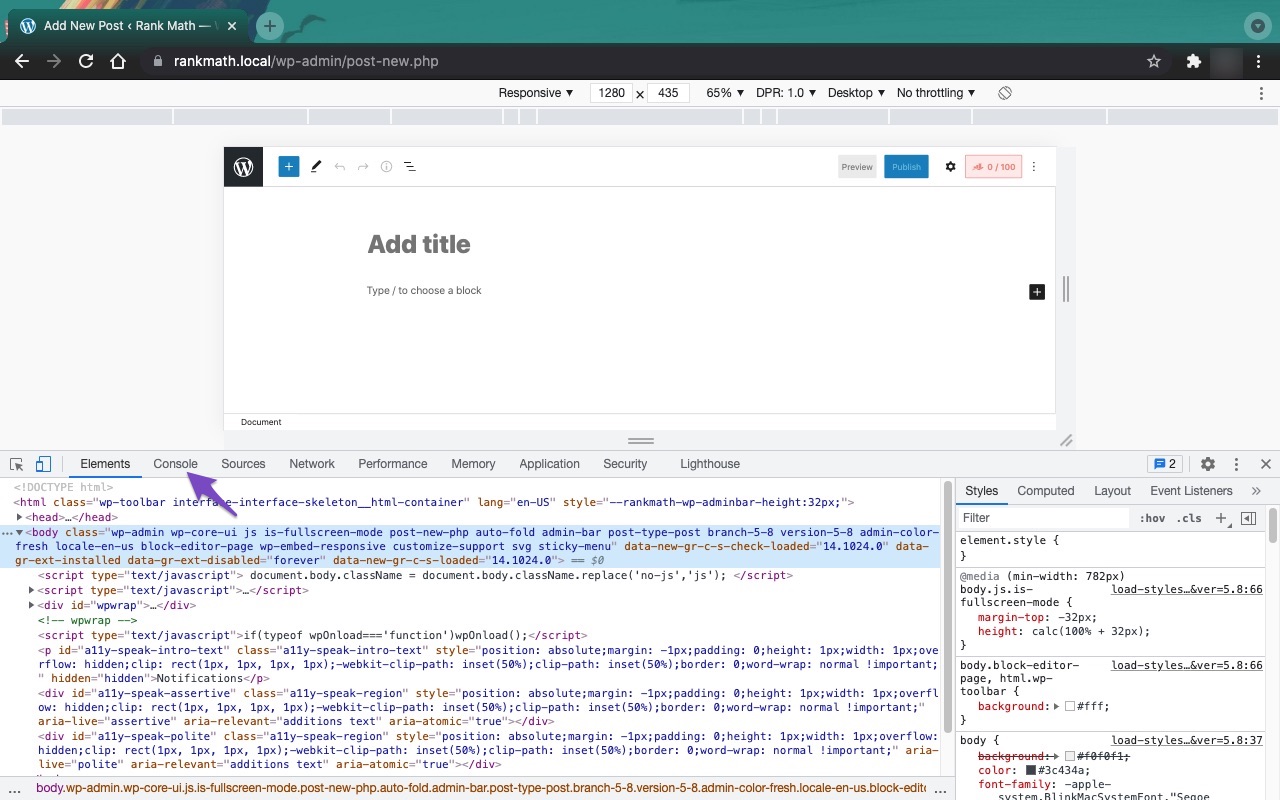
If you continue to experience this issue after trying these steps, please reply to this ticket with your site URL so that a human agent from our support team can assist you further. Thank you for bringing this concern to our attention!
Hello,
We’re not quite sure about the disappearing HTML tags you’re referring to. The metadata are still present in your page’s source code after checking it and giving it some time.
Could you please share the screenshot of the issue so we can check further? You can upload screenshots using this tool and add the link here.
Also, it seems that you’re using Rank Math PRO, but the account you have used to open this ticket is the Rank Math free version.
Please search and forward a receipt from FastSpring.com or the email address you used to purchase so we can locate your account and verify it.
Looking forward to helping you.
Hello,
It looks like you’ve shared the same screencast for “First” and “Second”.
However, if you’re referring to the text inside the Category description box, it is not controlled by the Rank Math plugin.
You can follow this troubleshooting guide to confirm if any other plugin or theme you’re using on your website is conflicting with this section: https://rankmath.com/kb/check-plugin-conflicts/
Let us know how it goes. Looking forward to helping you.
Thank you.
The HTML tags in your SEO titles or meta descriptions are being stripped out because most SEO plugins and content management systems automatically remove them. This is done to ensure compatibility with search engines, which don’t render or benefit from HTML in metadata. Although the tags might appear temporarily, the system likely sanitizes them shortly after saving. For formatting or emphasis, use HTML only in the visible content on the category page, not in the SEO fields. Stick to plain text with strong keywords for SEO titles and descriptions.
Hello @grace-miller,
Thank you for your contribution. You are right, HTML tags have no relevance to SEO titles or descriptions, so they are being stripped to ensure compatibility with search engines.
@juanjocactusdigital, for SEO titles and descriptions, it’s best to stick with plain text and focus on including strong keywords. If you need to format the content for emphasis, try doing so in the visible content of the category page instead.Hope that helps, and please do not hesitate to let us know if you need our assistance with anything else.
Please I need an answer to enter the rich Text in a dynamic way
Hello,
The second link to the video is not valid. Can you please re-upload it so we can completely understand the situation?
Please note that you shouldn’t integrate HTML tags inside the SEO description, as usually the accepted information is plain text on the SERP.
Looking forward to helping you with this one.
The second video is this one: https://drive.google.com/file/d/1Es-zM2Fm9-xHTPIdn6pCqbzdb5jddYSA/view?usp=sharing
Im not talking about the SEO description of Rank Math, Im talking about the Category Description of Woocommerce… With your plugin the category description box is enabled with the editor WYSIWYG, but after some time it becames as the second video. Like it removes the html tags.
How is the proper way to set it?
Hello,
We might need to take a closer look at the settings. Please edit the first post on this ticket and include your WordPress login in the designated Sensitive Data section.
Please do take a complete backup of your website before sharing the information with us.
It is completely secure and only our support staff has access to that section. If you want, you can use the below plugin to generate a temporary login URL to your website and share that with us instead:
https://wordpress.org/plugins/temporary-login-without-password/
You can use the above plugin in conjunction with the WP Security Audit Log to monitor what changes our staff might make on your website (if any):
https://wordpress.org/plugins/wp-security-audit-log/
We really look forward to helping you.
Hello,
I have updated the sensitive data as requested. Can you please check further?
Thank you.
Sensitive data just added
Hello,
We tested this on your website dashboard, but we were able to save the HTML tags applied to the description. See video screencasts below:
https://i.rankmath.com/v/WAtaGj
https://i.rankmath.com/v/ErUL7S
Looking forward to helping you with this one.
I know. But after a day or two some that categories removes the title tags. As the screen record that I link here from right now. The same category you modify, now is plain text. I also put the first title to an h2, lets check if when u see this, it becomes a <p>.
https://drive.google.com/file/d/1lxZwupfzFLHANFz_FXrtcyo2pbpcYGxv/view?usp=share_link
This happens with the big part of the categories, I don’t understand why it don´t keep it, only in some of them… As is normal, I wrote all categories with the titles structure at the beginning of this… And after some time, it becomes just a paragraph.
??
Hello,
Sorry for the delay. We checked your website now but we don’t see the issue. The HTML format is still there. We also tried this from our local setup and we couldn’t reproduce the issue as well.
In this case, please check if there are other plugins that are conflicting with the functionality of our plugin. You can follow this guide for that: https://rankmath.com/kb/check-plugin-conflicts/
Only the site admin would know and your users won’t be affected by this troubleshooting.
However, if you don’t want your website to be affected by this troubleshooting, you can create a staging website on your end, reproduce the error there, and share the login access here, this will allow us to deeply investigate the issue and resolve it permanently without worrying about breaking the live website.
You may also follow this article to create the staging website: https://www.wpbeginner.com/wp-tutorials/how-to-create-staging-environment-for-a-wordpress-site/
Looking forward to helping you with this one.
Hello,
Since we did not hear back from you for 15 days, we are assuming that you found the solution. We are closing this support ticket.
If you still need assistance or any other help, please feel free to open a new support ticket, and we will be more than happy to assist.
Thank you.
-



The ticket ‘CATEGORY DESCRIPTION is not keeping the html format of seo title tags’ is closed to new replies.