Hello,
We apologize for the issue you are facing with connecting your Rank Math Pro subscription to your WordPress site. To resolve this, please ensure that you are following these steps:
-
Disconnect Your Account: Go to your WordPress dashboard and navigate to Rank Math SEO → Dashboard → Help. Click on the Disconnect Account button.
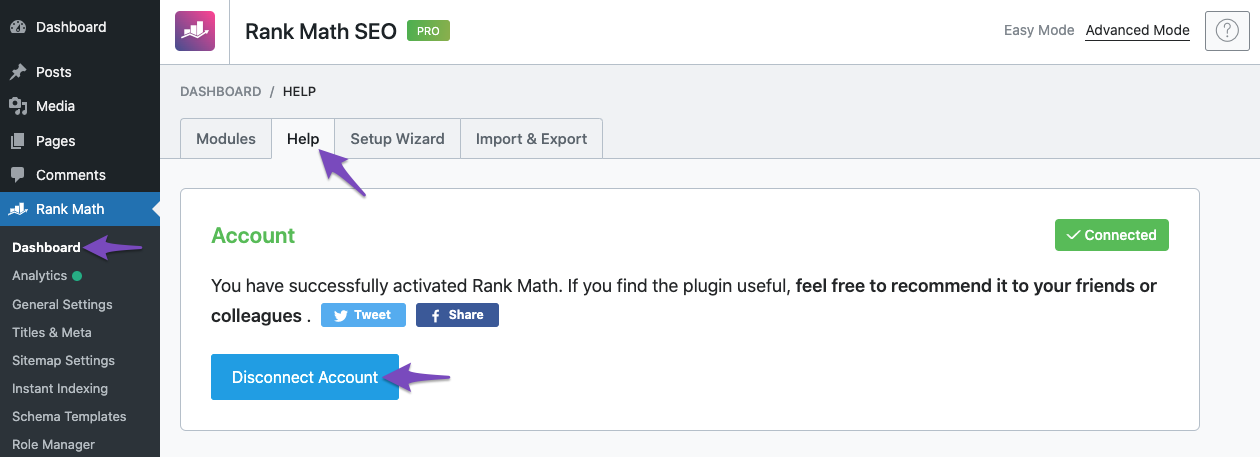
-
Reconnect Your Account: After disconnecting, click on the Connect Now button.

-
Select the Correct Account: Make sure to select the correct Rank Math account associated with your Pro license and click OK, ACTIVATE NOW.

If you continue to experience issues, please reply to this ticket, and a human agent from our support team will assist you further in manually connecting your license.
Thank you for raising this concern, and we appreciate your patience as we work to resolve it!
Sources:
How to Upgrade to Rank Math PRO » Rank Math
Hello,
It seems like you’ve marked this ticket as resolved.
Can you please confirm if you still need our assistance with this topic or anything else?
Looking forward to hearing back from you.
Thank you.
I have the same problem but I dont know which email is the pro account connected to, what do I do?
Hello,
We are glad to know that this issue has been resolved. Thank you for letting us know.
This ticket will be closed now, but you can always open a new one if you have any other questions or concerns. We are here to help you with anything related to Rank Math.
We appreciate your patience and cooperation throughout this process.
Thank you for choosing Rank Math.





